Un programador de calefacción construido encima de un Heltec WiFi LoRa 32. Controla dos zonas independientes de acumuladores eléctricos (radiadores de inercia) de unos 3,5 kW cada uno, mediante dos contactores de 20 A. Web embebida con WebSocket, MQTT, horarios configurables en JSON, OTA y monitorización de consumo en tiempo real por RS485 Modbus.
01 — Qué hace y por qué
El sistema controla dos zonas de acumuladores eléctricos independientes (R1 y R2) a través de sendos contactores de 20 amperios. Cada zona maneja unos 3,5 kW, suficiente para una habitación grande. Tiene dos modos de funcionamiento:
- Manual: los interruptores de la web encienden y apagan directamente.
- Auto: sigue una programación horaria en JSON. Comprueba el horario cada 10 segundos contra la hora NTP.
Además de controlar las zonas, mide el consumo eléctrico en tiempo real: voltaje, corriente, potencia activa, factor de potencia, frecuencia y energía acumulada (kWh y kvarh). Todo esto lo publica por MQTT y lo muestra en la web.
02 — Hardware y pines
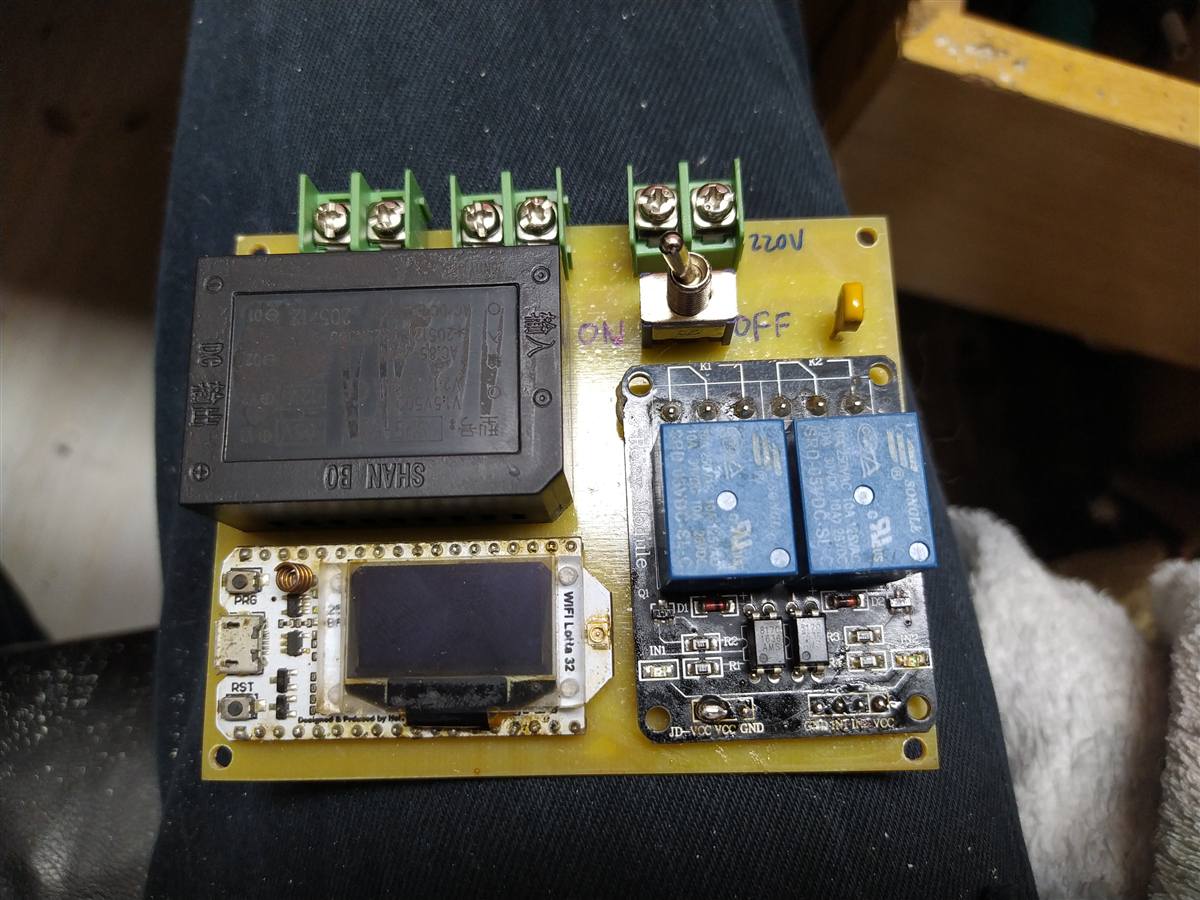
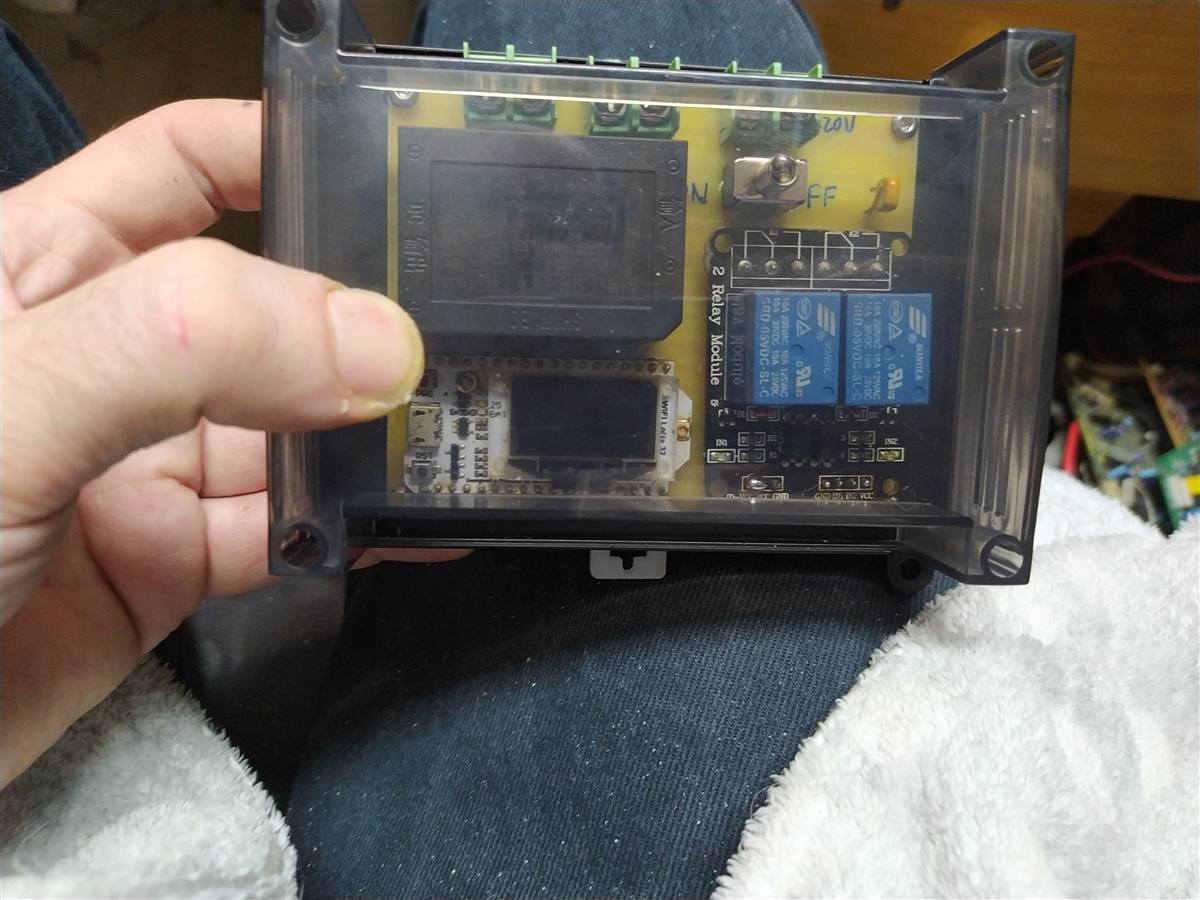
El cerebro es un Heltec WiFi LoRa 32 V1 (ESP32). Lo tenía por ahí y tiene pantalla OLED incorporada, lo que viene bien para mostrar la IP y el estado de los relés sin abrir la caja. Los pines elegidos para los relés son el 12 y el 13. El truco para el módulo de relés activo en bajo es que el pin va en modo OUTPUT LOW para activar y en modo INPUT (alta impedancia) para desactivar — así el pin no fuerza nada cuando está "apagado".
// PINES (HELTEC WIFI LORA 32 V1)
const int PIN_R1 = 12;
const int PIN_R2 = 13;

// RS485
const int MAX485_DE = 25;  // Enable/disable transmisión
const int MAX485_RX = 23;
const int MAX485_TX = 22;

// Activar contactor: salida a LOW
// Desactivar: INPUT (alta impedancia, no fuerza)
if (relay1State) {
  pinMode(PIN_R1, OUTPUT);
  digitalWrite(PIN_R1, LOW);
} else {
  pinMode(PIN_R1, INPUT);
}
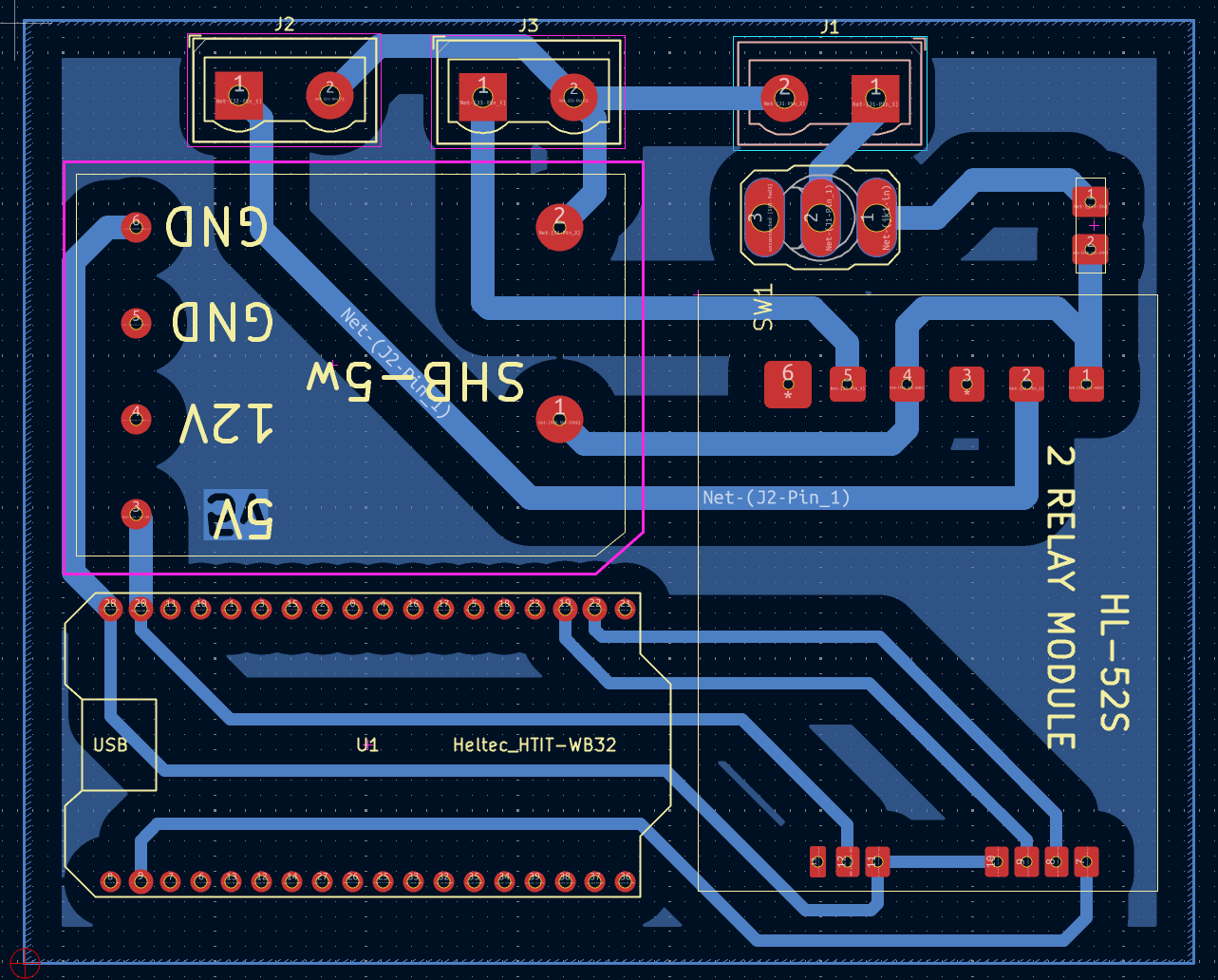
Conexión al MAX485 (advertencia): en mi montaje los tres cables al módulo MAX485 (DE, RX, TX) van soldados directamente por arriba a los pines de la Heltec, de manera bastante guarra. No están reflejados ni en el esquema KiCad ni en la PCB fresada — la PCB solo lleva la lógica de los relés y la alimentación.
Antena WiFi: la Heltec V1 tiene conector U.FL pero en mi caso no he montado antena externa porque el router está literalmente al lado del cuadro eléctrico. Si vas a instalar el cuadro lejos del router, monta antena.
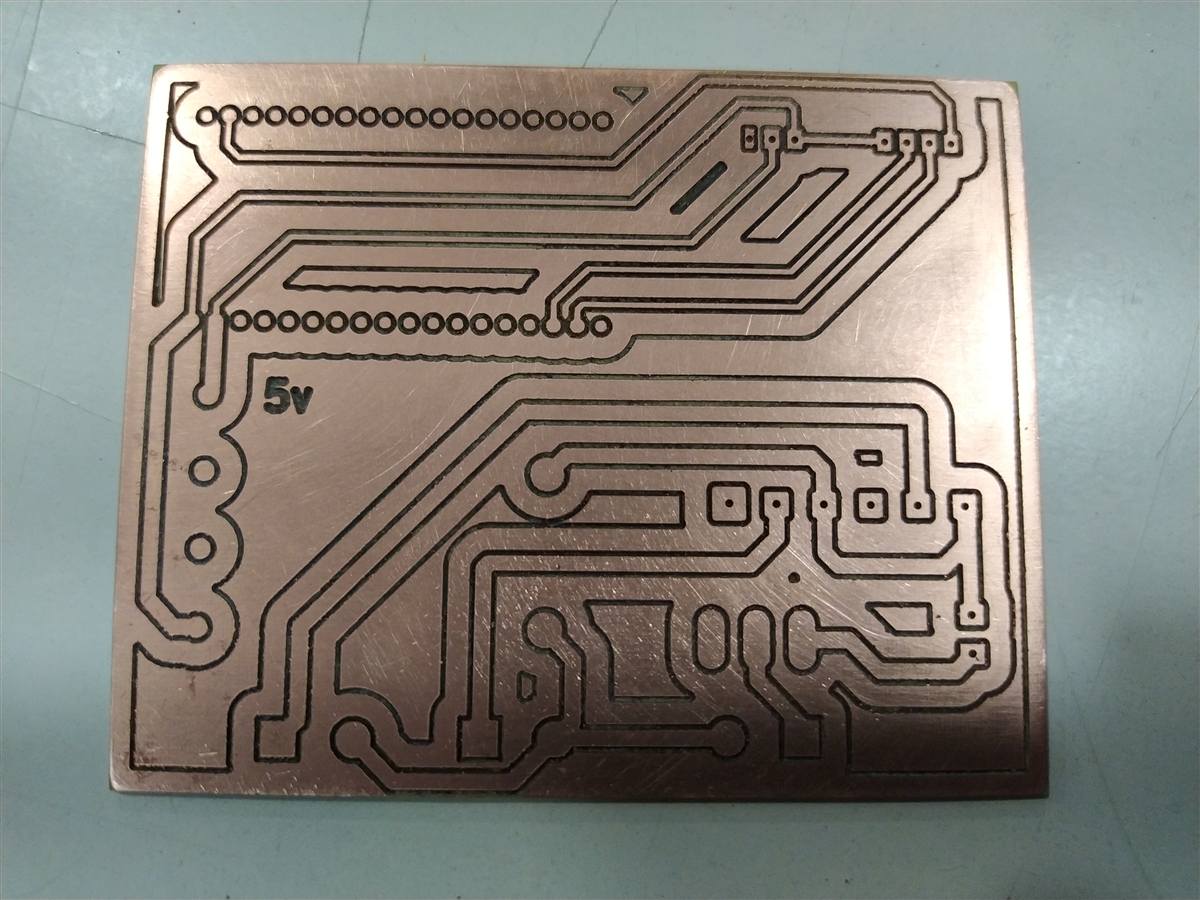
03 — La placa fresada en CNC
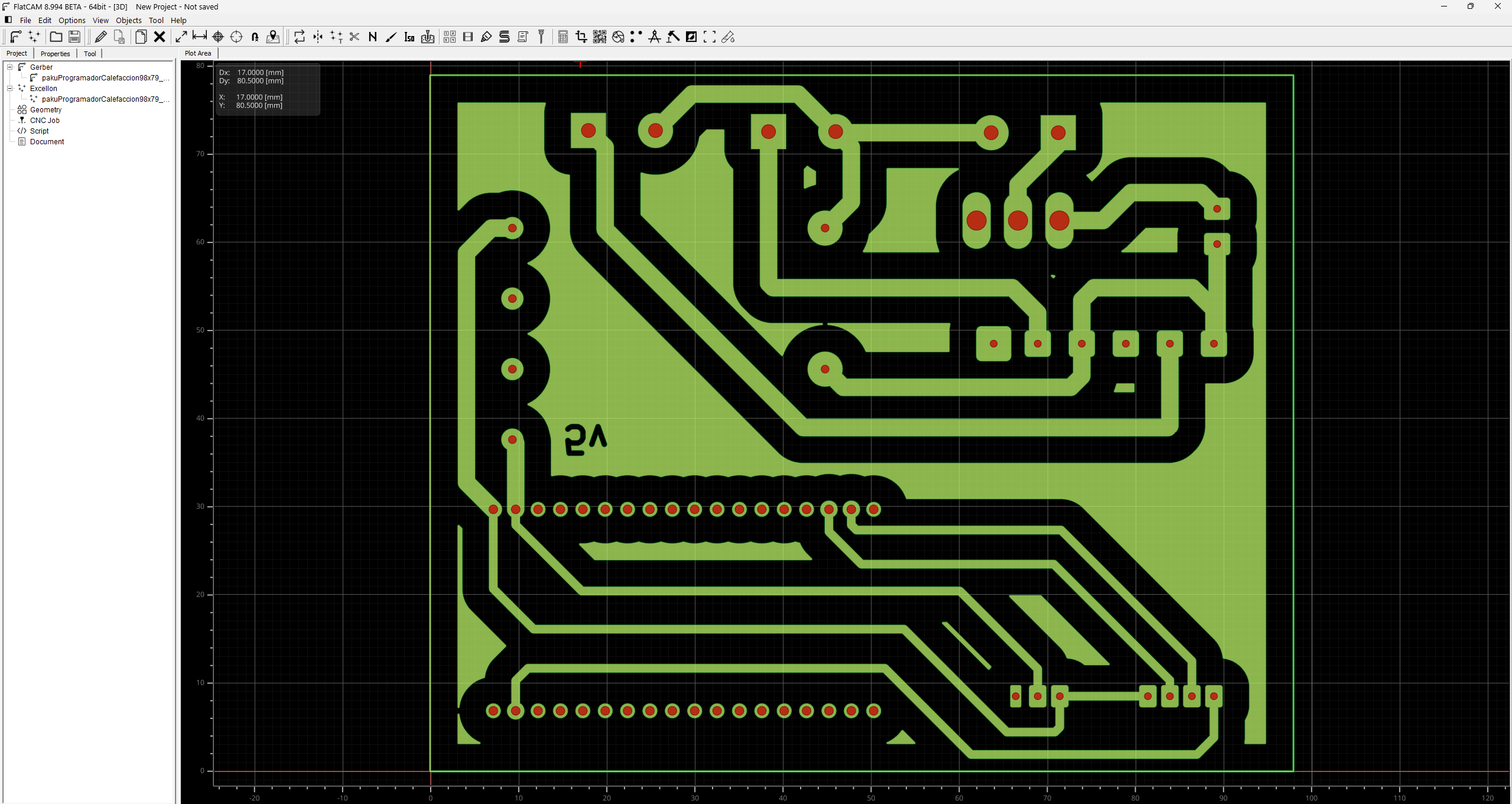
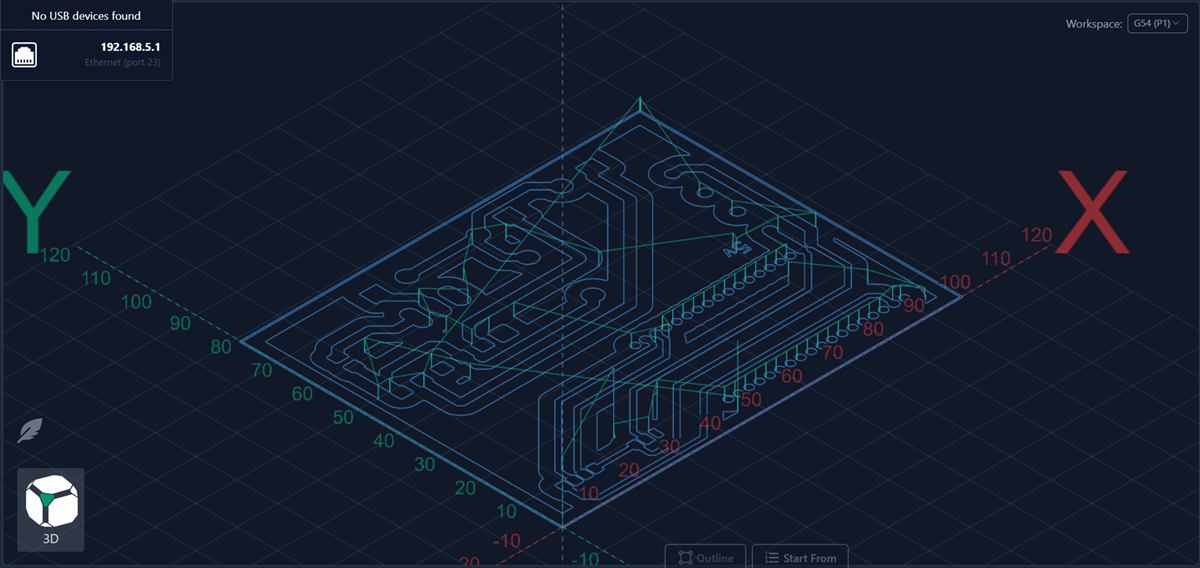
La PCB de adaptación se fresó en la CNC en lugar de encargarla. El flujo es el habitual: diseño en KiCad → exportar Gerbers → FlatCAM genera el G-code de fresado y taladrado → gSender lo ejecuta.
04 — Medidor de energía por Modbus
El medidor de energía habla Modbus RTU a 9600 baudios sobre el bus RS485. La lectura está optimizada para no bloquear el loop: si el primer registro (voltaje) falla, se asume que el medidor no responde y se sale inmediatamente. Así solo se sufre un timeout en lugar de siete.
void readEnergyMeter() {
    // Si el voltaje falla → salida rápida (solo 1 timeout)
    result = node.readHoldingRegisters(0x0000, 1);
    if (result != node.ku8MBSuccess) {
        em_volts = 0.0;
        return;
    }
    em_volts = node.getResponseBuffer(0) * 0.1;

    // Amperios (registro 0x0003)
    result = node.readHoldingRegisters(0x0003, 2);
    if (result == node.ku8MBSuccess)
        em_amps = node.getResponseBuffer(0) * 0.01;

    // Potencia activa (registro 0x0008)
    result = node.readHoldingRegisters(0x0008, 2);
    if (result == node.ku8MBSuccess)
        em_watts = node.getResponseBuffer(0);

    // Energía acumulada — dato de 32 bits en dos registros
    result = node.readHoldingRegisters(0x001D, 2);
    if (result == node.ku8MBSuccess) {
        unsigned long high = node.getResponseBuffer(0);
        unsigned long low  = node.getResponseBuffer(1);
        em_kwh = ((high << 16) | low) * 0.01;
    }
}
05 — La interfaz web y WebSocket
La web está embebida en el firmware dentro de un array PROGMEM (archivo webpage.h, abajo del todo). Tiene tres pestañas: Control, Horarios y Config. El acceso está protegido con autenticación HTTP básica.
El estado se actualiza en tiempo real mediante WebSocket: el ESP32 empuja un JSON cada 10 segundos (o inmediatamente cuando cambia algo). La web recibe el estado de los relés y los datos del medidor sin necesidad de recargar.
// Fragmento del JSON de estado que envía el ESP32
{
  "type": "status",
  "r1": true,
  "r2": false,
  "mode": "auto",
  "em": {
    "v": "231.4",
    "c": "3.12",
    "w": "721",
    "pf": "0.998",
    "f": "50.01",
    "e": "12.45",
    "r": "0.08"
  }
}
Los horarios se editan directamente como JSON en un textarea. El formato es un array de reglas con días de la semana (0=domingo), hora de inicio, hora de fin y relés afectados:
[
  {
    "d": [1, 2, 3, 4, 5],
    "start": "07:00",
    "end": "09:00",
    "r": [1, 2]
  },
  {
    "d": [0, 6],
    "start": "09:00",
    "end": "11:00",
    "r": [1]
  }
]
06 — MQTT e integración domótica
Todos los topics siguen la convención tuhogar/calefaccion/... y el servidor, usuario y contraseña se configuran desde la propia web (no hay que recompilar). Los valores se persisten en la flash del ESP32 usando la librería Preferences.
// Topics de control (suscripción)
tuhogar/calefaccion/r1/set        → "1" / "ON" para encender
tuhogar/calefaccion/r2/set        → "1" / "ON" para encender
tuhogar/calefaccion/mode/set      → "auto" / "manual"
tuhogar/calefaccion/schedule/set  → JSON con las reglas

// Topics de estado (publicación, retained)
tuhogar/calefaccion/r1/state      → "1" / "0"
tuhogar/calefaccion/r2/state      → "1" / "0"
tuhogar/calefaccion/mode/state    → "auto" / "manual"

// Medidor eléctrico (publicación cada 5s)
tuhogar/calefaccion/em/voltage    → V
tuhogar/calefaccion/em/current    → A
tuhogar/calefaccion/em/power      → W
tuhogar/calefaccion/em/energy     → kWh
tuhogar/calefaccion/em/reactive   → kvarh
tuhogar/calefaccion/em/pf         → factor de potencia
tuhogar/calefaccion/em/freq       → Hz
La reconexión MQTT es automática y usa un timer de FreeRTOS para no bloquear el loop. OTA también está habilitado, así que se puede actualizar el firmware desde el IDE sin tocar la caja.
07 — Filtros snubber: imprescindibles
Aviso para el navegante: ni se te ocurra colgar un ESP32 de un contactor grande sin filtros snubber. Cuando los contactos abren bajo carga inductiva (motores, transformadores, incluso resistencias con inductancias parásitas en el cableado), saltan picos de tensión de cientos o miles de voltios. Esos picos viajan por el cableado, se acoplan al de baja tensión y, en el mejor caso, te resetean el micro. En el peor, te lo fríen. Lo de "a mí me funciona sin nada" dura hasta que deja de funcionar — y te quedas sin saber por qué.
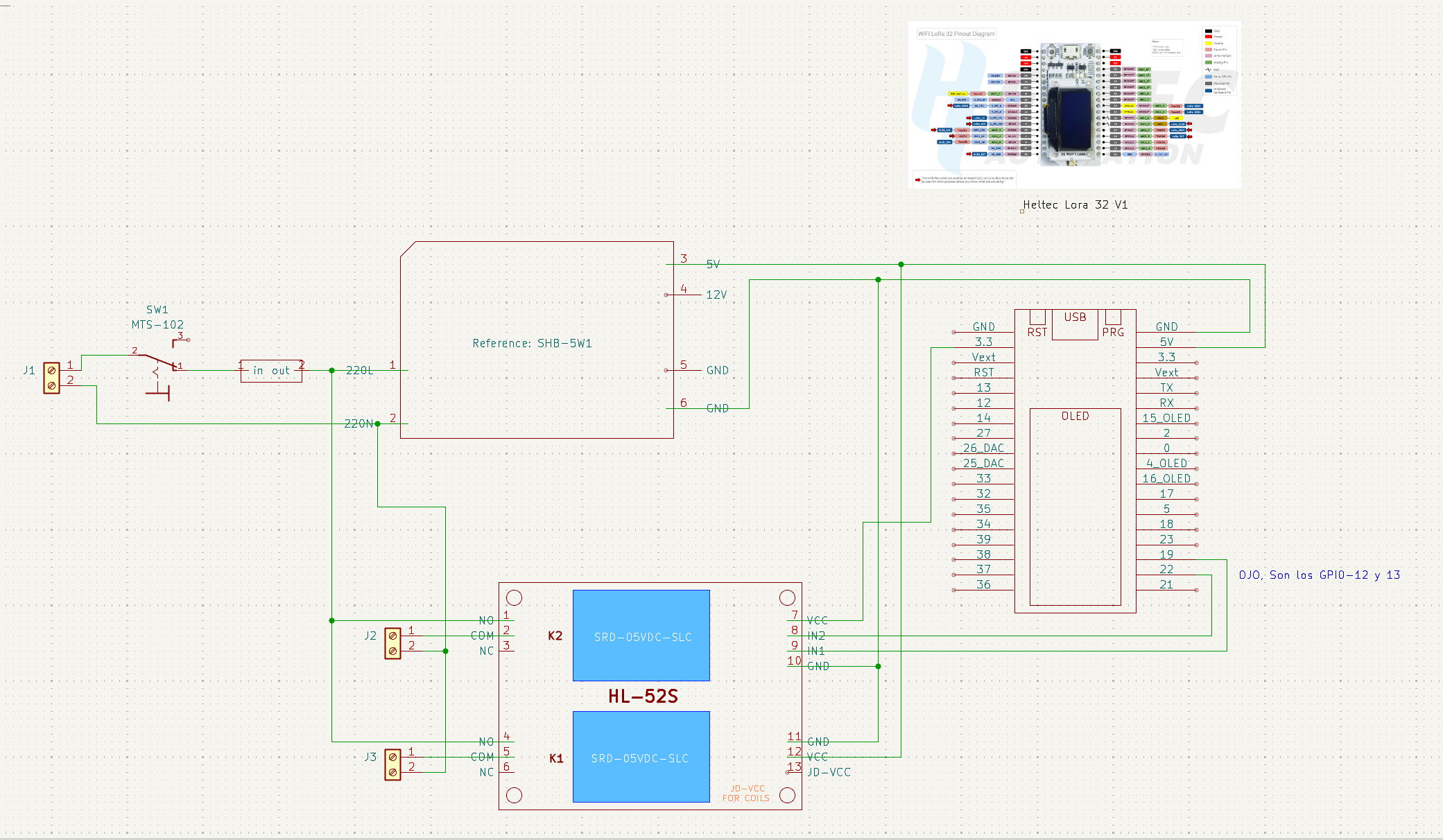
Mi sistema sí lleva los snubbers puestos. No tengo foto en la caja (están detrás), pero el esquema eléctrico es éste:
El condensador tiene que ser X2 (certificado para fallar en abierto bajo tensión de red). Un cerámico normal no vale: si rompe en cortocircuito, te quedas con un cortocircuito permanente entre fase y neutro. La resistencia, una de hilo bobinado o cementada de 1 W aguanta de sobra.
08 — Código del firmware
El firmware completo (calefaccion.ino) sin las contraseñas, usuarios ni servidores reales. Sustituye los TU_* por los tuyos antes de compilar.
Librerías necesarias. Cuidado: las versiones originales de AsyncTCP y ESPAsyncWebServer de me-no-dev están abandonadas y dan problemas de compilación con cores recientes del ESP32. Hay que usar los forks activos de la organización ESP32Async:
- AsyncTCP — fork activo: github.com/ESP32Async/AsyncTCP
- ESPAsyncWebServer — fork activo: github.com/ESP32Async/ESPAsyncWebServer
- AsyncMQTT_ESP32 (Khoi Hoang) — github.com/khoih-prog/AsyncMQTT_ESP32 · disponible en Arduino Library Manager como
AsyncMQTT_ESP32 - ArduinoJson (Benoît Blanchon) — github.com/bblanchon/ArduinoJson · este código asume v7+
- U8g2 (Oliver Kraus) — github.com/olikraus/u8g2 · para la OLED del Heltec
- ModbusMaster (Doc Walker / 4-20ma) — github.com/4-20ma/ModbusMaster
El resto (WiFi.h, Preferences.h, ArduinoOTA.h, Wire.h) vienen con el core Arduino para ESP32: github.com/espressif/arduino-esp32.
// heltec wifi lora 32 (v1) - Programador de calefacción

#include <Arduino.h>
#include <WiFi.h>
#include <AsyncTCP.h>
#include <ESPAsyncWebServer.h>
#include <Preferences.h>
#include <AsyncMQTT_ESP32.h>
#include <ArduinoJson.h>
#include <time.h>
#include <U8g2lib.h>
#include <Wire.h>
#include <ArduinoOTA.h>
#include <ModbusMaster.h>
#include "webpage.h"

// --- PINES (HELTEC WIFI LORA 32 V1) ---
const int PIN_R1 = 12;
const int PIN_R2 = 13;

// PINES RS485 (van soldados por arriba al Heltec, no en la PCB)
const int MAX485_DE = 25;
const int MAX485_RX = 23;
const int MAX485_TX = 22;

// --- CREDENCIALES (sustituir antes de compilar) ---
const char* WEB_USER = "admin";
const char* WEB_PASS = "TU_CONTRASEÑA_WEB";
const char* OTA_PASS = "TU_CONTRASEÑA_OTA";

U8G2_SSD1306_128X64_NONAME_F_HW_I2C u8g2(U8G2_R0, 16, 15, 4);
ModbusMaster node;

const char* AP_SSID = "Calefaccion_Heltec";
const char* AP_PASS = "TU_CONTRASEÑA_AP";

char wifi_ssid[40] = "";
char wifi_pass[40] = "";
char mqtt_server[40] = "mqtt.tuservidor.com";
char mqtt_port_str[6] = "1883";
char mqtt_user[40] = "tu_usuario";
char mqtt_pass[40] = "tu_contraseña";

const char* ntpServer = "pool.ntp.org";
const long  gmtOffset_sec = 3600;
const int   daylightOffset_sec = 3600;

// ESTADO
bool relay1State = false;
bool relay2State = false;
String systemMode = "manual";
String scheduleJson = "[]";

// DATOS ENERGIA
float em_volts = 0.0;
float em_amps = 0.0;
float em_watts = 0.0;
float em_pf = 0.0;
float em_freq = 0.0;
float em_kwh = 0.0;
float em_kvarh = 0.0;

// BANDERAS
volatile bool updateRelaysNeeded = false;
volatile bool saveConfigNeeded = false;
volatile bool saveScheduleNeeded = false;
volatile bool mqttPublishNeeded = false;

bool shouldRestart = false;
unsigned long restartTimer = 0;

// MQTT TOPICS
const char* TOPIC_R1_SET     = "tuhogar/calefaccion/r1/set";
const char* TOPIC_R2_SET     = "tuhogar/calefaccion/r2/set";
const char* TOPIC_MODE_SET   = "tuhogar/calefaccion/mode/set";
const char* TOPIC_SCHED_SET  = "tuhogar/calefaccion/schedule/set";
const char* TOPIC_SCHED_GET  = "tuhogar/calefaccion/schedule/get";
const char* TOPIC_SCHED_STATE= "tuhogar/calefaccion/schedule/state";

// Topics Energia
const char* TOPIC_EM_VOLT  = "tuhogar/calefaccion/em/voltage";
const char* TOPIC_EM_AMP   = "tuhogar/calefaccion/em/current";
const char* TOPIC_EM_WATT  = "tuhogar/calefaccion/em/power";
const char* TOPIC_EM_PF    = "tuhogar/calefaccion/em/pf";
const char* TOPIC_EM_FREQ  = "tuhogar/calefaccion/em/freq";
const char* TOPIC_EM_KWH   = "tuhogar/calefaccion/em/energy";
const char* TOPIC_EM_KVARH = "tuhogar/calefaccion/em/reactive";

AsyncMqttClient mqttCliente;
TimerHandle_t mqttReconnectTimer;
AsyncWebServer servidorWeb(80);
AsyncWebSocket ws("/ws");
Preferences preferences;

// PROTOTIPOS
void conectarAMqtt();
String processor(const String& var);
void onWsEvent(AsyncWebSocket*, AsyncWebSocketClient*, AwsEventType, void*, uint8_t*, size_t);
void onMqttConnect(bool sessionPresent);
void onMqttMessage(char*, char*, AsyncMqttClientMessageProperties, size_t, size_t, size_t);
void aplicarRelesFisicos();
void checkSchedule();
void logStatus(String l1, String l2 = "");
void notificarEstadoWS();
void publishMqttState();
void setupOTA();
void readEnergyMeter();

// CALLBACKS RS485
void preTransmission()  { digitalWrite(MAX485_DE, HIGH); }
void postTransmission() { digitalWrite(MAX485_DE, LOW); }

void setup() {
  Serial.begin(115200);
  delay(100);

  pinMode(PIN_R1, INPUT);
  pinMode(PIN_R2, INPUT);

  pinMode(MAX485_DE, OUTPUT);
  digitalWrite(MAX485_DE, LOW);

  Serial2.begin(9600, SERIAL_8N1, MAX485_RX, MAX485_TX);
  node.begin(1, Serial2);
  node.preTransmission(preTransmission);
  node.postTransmission(postTransmission);

  Wire.begin(16, 15);
  u8g2.begin();
  u8g2.setFont(u8g2_font_6x10_tf);
  logStatus("Iniciando...");

  preferences.begin("calefaccion", false);
  if (preferences.getString("wifi_ssid", "").length() == 0) {
      preferences.putString("wifi_ssid", "TU_RED_WIFI");
      preferences.putString("wifi_pass", "TU_CONTRASEÑA_WIFI");
  }
  if (preferences.getString("wifi_ssid", "").length() > 0) {
      strncpy(wifi_ssid,  preferences.getString("wifi_ssid").c_str(),  sizeof(wifi_ssid));
      strncpy(wifi_pass,  preferences.getString("wifi_pass").c_str(),  sizeof(wifi_pass));
      strncpy(mqtt_server,preferences.getString("mqtt_server").c_str(),sizeof(mqtt_server));
      strncpy(mqtt_port_str,preferences.getString("mqtt_port").c_str(),sizeof(mqtt_port_str));
      strncpy(mqtt_user,  preferences.getString("mqtt_user").c_str(),  sizeof(mqtt_user));
      strncpy(mqtt_pass,  preferences.getString("mqtt_pass").c_str(),  sizeof(mqtt_pass));
  }
  scheduleJson = preferences.getString("schedule", "[]");
  systemMode   = preferences.getString("mode", "manual");
  preferences.end();

  WiFi.persistent(false);
  WiFi.disconnect(true);
  delay(100);
  WiFi.mode(WIFI_AP_STA);
  WiFi.softAP(AP_SSID, AP_PASS);

  if (strlen(wifi_ssid) > 0) {
    logStatus("Conectando a:", String(wifi_ssid));
    WiFi.begin(wifi_ssid, wifi_pass);
    int intentos = 0;
    while (WiFi.status() != WL_CONNECTED && intentos < 20) {
      delay(200); Serial.print("."); intentos++;
    }
  }

  configTime(gmtOffset_sec, daylightOffset_sec, ntpServer);
  setupOTA();

  ws.onEvent(onWsEvent);
  servidorWeb.addHandler(&ws);
  servidorWeb.on("/", HTTP_GET, [](AsyncWebServerRequest *request) {
    if (!request->authenticate(WEB_USER, WEB_PASS)) return request->requestAuthentication();
    request->send(200, "text/html", index_html, processor);
  });
  servidorWeb.on("/saveconfig", HTTP_POST, [](AsyncWebServerRequest *request) {
    if (!request->authenticate(WEB_USER, WEB_PASS)) return request->requestAuthentication();
    if (request->hasParam("ssid", true))   strncpy(wifi_ssid,   request->getParam("ssid",   true)->value().c_str(), 40);
    if (request->hasParam("pass", true))   strncpy(wifi_pass,   request->getParam("pass",   true)->value().c_str(), 40);
    if (request->hasParam("server", true)) strncpy(mqtt_server, request->getParam("server", true)->value().c_str(), 40);
    saveConfigNeeded = true;
    request->send(200, "text/html", "<h1>Guardado. Reiniciando...</h1>");
    shouldRestart = true;
    restartTimer = millis();
  });
  servidorWeb.begin();

  mqttReconnectTimer = xTimerCreate("mqttTimer", pdMS_TO_TICKS(5000), pdFALSE, (void*)0,
                                    reinterpret_cast<TimerCallbackFunction_t>(conectarAMqtt));
  mqttCliente.onConnect(onMqttConnect);
  mqttCliente.onMessage(onMqttMessage);
  mqttCliente.setServer(mqtt_server, atoi(mqtt_port_str));
  if (strlen(mqtt_user) > 0) mqttCliente.setCredentials(mqtt_user, mqtt_pass);

  updateRelaysNeeded = true;
}

unsigned long lastCheck = 0;
unsigned long lastScreen = 0;
unsigned long lastModbus = 0;

void loop() {
  ArduinoOTA.handle();
  ws.cleanupClients();

  if (updateRelaysNeeded) { updateRelaysNeeded = false; aplicarRelesFisicos(); }
  if (saveScheduleNeeded) {
      saveScheduleNeeded = false;
      preferences.begin("calefaccion", false);
      preferences.putString("schedule", scheduleJson);
      preferences.end();
      if (systemMode == "auto") checkSchedule();
  }
  if (saveConfigNeeded) {
      saveConfigNeeded = false;
      preferences.begin("calefaccion", false);
      preferences.putString("wifi_ssid", wifi_ssid);
      preferences.putString("wifi_pass", wifi_pass);
      preferences.putString("mqtt_server", mqtt_server);
      preferences.end();
  }
  if (mqttPublishNeeded) { mqttPublishNeeded = false; publishMqttState(); }
  if (shouldRestart && (millis() - restartTimer > 2000)) ESP.restart();

  if (WiFi.status() == WL_CONNECTED && !mqttCliente.connected()) {
     if (xTimerIsTimerActive(mqttReconnectTimer) == pdFALSE) xTimerStart(mqttReconnectTimer, 0);
  }

  if (millis() - lastScreen > 1000) {
    lastScreen = millis();
    u8g2.firstPage();
    do {
      if (WiFi.status() == WL_CONNECTED) {
          u8g2.setFont(u8g2_font_5x8_tf);
          u8g2.setCursor(0, 8);  u8g2.print("IP: "); u8g2.print(WiFi.localIP());
          u8g2.setCursor(0, 18); u8g2.print("W: "); u8g2.print(em_watts, 0);
                                 u8g2.print(" V: "); u8g2.print(em_volts, 0);
          u8g2.setFont(u8g2_font_profont12_tf);
          u8g2.setCursor(0,  35); u8g2.print("R1: "); u8g2.print(relay1State ? "ON" : "OFF");
          u8g2.setCursor(64, 35); u8g2.print("R2: "); u8g2.print(relay2State ? "ON" : "OFF");
          struct tm t;
          if (getLocalTime(&t)) {
            char b[10]; strftime(b, 10, "%H:%M:%S", &t);
            u8g2.setCursor(0, 55); u8g2.print(b);
          }
      } else {
          u8g2.setFont(u8g2_font_ncenB08_tr);
          u8g2.setCursor(25, 12); u8g2.print("MODO AP");
          u8g2.setFont(u8g2_font_6x10_tf);
          u8g2.setCursor(0, 30); u8g2.print(AP_SSID);
          u8g2.setCursor(0, 58); u8g2.print("192.168.4.1");
      }
    } while (u8g2.nextPage());
  }

  if (millis() - lastCheck > 10000) {
    lastCheck = millis();
    if (systemMode == "auto") checkSchedule();
    notificarEstadoWS();
  }

  // MODBUS cada 5 s
  if (millis() - lastModbus > 5000) {
      readEnergyMeter();
      lastModbus = millis();
  }
}

// --- MODBUS (lectura completa con fail-fast) ---
void readEnergyMeter() {
    uint8_t result;

    // 1. Voltaje. Si falla, salimos rápido.
    result = node.readHoldingRegisters(0x0000, 1);
    if (result != node.ku8MBSuccess) {
        em_volts = 0.0;
        return;
    }
    em_volts = node.getResponseBuffer(0) * 0.1;

    result = node.readHoldingRegisters(0x0003, 2);
    if (result == node.ku8MBSuccess) em_amps = node.getResponseBuffer(0) * 0.01;

    result = node.readHoldingRegisters(0x0008, 2);
    if (result == node.ku8MBSuccess) em_watts = node.getResponseBuffer(0);

    result = node.readHoldingRegisters(0x0014, 1);
    if (result == node.ku8MBSuccess) em_pf = node.getResponseBuffer(0) * 0.001;

    result = node.readHoldingRegisters(0x001A, 1);
    if (result == node.ku8MBSuccess) em_freq = node.getResponseBuffer(0) * 0.01;

    result = node.readHoldingRegisters(0x001D, 2);
    if (result == node.ku8MBSuccess) {
         unsigned long high = node.getResponseBuffer(0);
         unsigned long low  = node.getResponseBuffer(1);
         em_kwh = ((high << 16) | low) * 0.01;
    }

    result = node.readHoldingRegisters(0x003B, 2);
    if (result == node.ku8MBSuccess) {
         unsigned long high = node.getResponseBuffer(0);
         unsigned long low  = node.getResponseBuffer(1);
         em_kvarh = ((high << 16) | low) * 0.01;
    }

    if (WiFi.status() == WL_CONNECTED && mqttCliente.connected()) {
        mqttCliente.publish(TOPIC_EM_VOLT,  0, true, String(em_volts).c_str());
        mqttCliente.publish(TOPIC_EM_AMP,   0, true, String(em_amps).c_str());
        mqttCliente.publish(TOPIC_EM_WATT,  0, true, String(em_watts).c_str());
        mqttCliente.publish(TOPIC_EM_PF,    0, true, String(em_pf).c_str());
        mqttCliente.publish(TOPIC_EM_FREQ,  0, true, String(em_freq).c_str());
        mqttCliente.publish(TOPIC_EM_KWH,   0, true, String(em_kwh).c_str());
        mqttCliente.publish(TOPIC_EM_KVARH, 0, true, String(em_kvarh).c_str());
    }
}

String processor(const String& var) {
  if (var == "WIFI_SSID")   return String(wifi_ssid);
  if (var == "WIFI_PASS")   return String(wifi_pass);
  if (var == "MQTT_SERVER") return String(mqtt_server);
  if (var == "MQTT_PORT")   return String(mqtt_port_str);
  if (var == "MQTT_USER")   return String(mqtt_user);
  if (var == "MQTT_PASS")   return String(mqtt_pass);
  return String();
}

void notificarEstadoWS() {
  JsonDocument doc;
  doc["type"] = "status";
  doc["r1"] = relay1State;
  doc["r2"] = relay2State;
  doc["mode"] = systemMode;
  JsonObject em = doc["em"].to<JsonObject>();
  em["v"]  = String(em_volts, 1);
  em["c"]  = String(em_amps,  2);
  em["w"]  = String(em_watts, 0);
  em["pf"] = String(em_pf,    3);
  em["f"]  = String(em_freq,  2);
  em["e"]  = String(em_kwh,   2);
  em["r"]  = String(em_kvarh, 2);
  String o; serializeJson(doc, o); ws.textAll(o);
}

void setupOTA() {
  ArduinoOTA.setHostname("Heltec-Calefaccion");
  ArduinoOTA.setPassword(OTA_PASS);
  ArduinoOTA.onStart([]() {
    u8g2.clearBuffer();
    u8g2.setCursor(0, 20); u8g2.print("UPDATING...");
    u8g2.sendBuffer();
  });
  ArduinoOTA.begin();
}

void logStatus(String l1, String l2) {
  Serial.println("[LOG] " + l1 + " " + l2);
  u8g2.clearBuffer();
  u8g2.setCursor(0, 20); u8g2.print(l1);
  u8g2.setCursor(0, 40); u8g2.print(l2);
  u8g2.sendBuffer();
}

void aplicarRelesFisicos() {
  if (relay1State) { pinMode(PIN_R1, OUTPUT); digitalWrite(PIN_R1, LOW); } else { pinMode(PIN_R1, INPUT); }
  if (relay2State) { pinMode(PIN_R2, OUTPUT); digitalWrite(PIN_R2, LOW); } else { pinMode(PIN_R2, INPUT); }
  publishMqttState();
  notificarEstadoWS();
}

void checkSchedule() {
  struct tm timeinfo;
  if (!getLocalTime(&timeinfo)) return;
  JsonDocument doc;
  if (deserializeJson(doc, scheduleJson)) return;
  bool newR1 = false, newR2 = false;
  int cM = timeinfo.tm_hour * 60 + timeinfo.tm_min;
  int cD = timeinfo.tm_wday;
  for (JsonObject rule : doc.as<JsonArray>()) {
    bool dM = false;
    JsonArray days = rule["d"];
    for (int d : days) if (d == cD) dM = true;
    if (!dM) continue;
    int sT = atoi(rule["start"]) * 60 + atoi((const char*)rule["start"] + 3);
    int eT = atoi(rule["end"])   * 60 + atoi((const char*)rule["end"]   + 3);
    if (cM >= sT && cM < eT) {
      JsonArray rels = rule["r"];
      for (int r : rels) { if (r == 1) newR1 = true; if (r == 2) newR2 = true; }
    }
  }
  if (relay1State != newR1 || relay2State != newR2) {
    relay1State = newR1;
    relay2State = newR2;
    updateRelaysNeeded = true;
  }
}

void onWsEvent(AsyncWebSocket *server, AsyncWebSocketClient *client, AwsEventType type,
               void *arg, uint8_t *data, size_t len) {
  if (type == WS_EVT_CONNECT) {
    updateRelaysNeeded = true;
    JsonDocument dS; dS["type"] = "schedule";
    JsonDocument temp; deserializeJson(temp, scheduleJson);
    dS["data"] = temp;
    String o; serializeJson(dS, o); client->text(o);
  } else if (type == WS_EVT_DATA) {
    JsonDocument doc; deserializeJson(doc, (char*)data, len);
    String t = doc["type"];
    if (t == "set_relay" && systemMode == "manual") {
      int id = doc["id"]; bool s = doc["state"];
      if (id == 1) relay1State = s; else if (id == 2) relay2State = s;
      updateRelaysNeeded = true;
    } else if (t == "set_mode") {
      systemMode = doc["mode"].as<String>();
      preferences.begin("calefaccion", false);
      preferences.putString("mode", systemMode);
      preferences.end();
      if (systemMode == "auto") checkSchedule();
      updateRelaysNeeded = true;
    } else if (t == "save_schedule") {
      scheduleJson = doc["data"].as<String>();
      saveScheduleNeeded = true;
    }
  }
}

void conectarAMqtt() {
  if (WiFi.status() == WL_CONNECTED) mqttCliente.connect();
}

void onMqttConnect(bool sessionPresent) {
  mqttCliente.subscribe(TOPIC_R1_SET,    1);
  mqttCliente.subscribe(TOPIC_R2_SET,    1);
  mqttCliente.subscribe(TOPIC_MODE_SET,  1);
  mqttCliente.subscribe(TOPIC_SCHED_SET, 1);
  mqttCliente.subscribe(TOPIC_SCHED_GET, 1);
  mqttPublishNeeded = true;
}

void publishMqttState() {
  if (WiFi.status() == WL_CONNECTED && mqttCliente.connected()) {
    mqttCliente.publish("tuhogar/calefaccion/r1/state",   0, true, relay1State ? "1" : "0");
    mqttCliente.publish("tuhogar/calefaccion/r2/state",   0, true, relay2State ? "1" : "0");
    mqttCliente.publish("tuhogar/calefaccion/mode/state", 0, true, systemMode.c_str());
  }
}

void onMqttMessage(char* topic, char* payload, AsyncMqttClientMessageProperties p,
                   size_t len, size_t i, size_t t) {
  String msg;
  for (size_t k = 0; k < len; k++) msg += (char)payload[k];
  String top = String(topic);
  bool cambio = false;

  if (top == TOPIC_MODE_SET) {
    if (msg == "auto" || msg == "manual") {
      systemMode = msg;
      preferences.begin("calefaccion", false);
      preferences.putString("mode", systemMode);
      preferences.end();
      if (systemMode == "auto") checkSchedule();
      cambio = true;
    }
  } else if (top == TOPIC_SCHED_SET) {
    if (msg == "DELETE") msg = "[]";
    scheduleJson = msg;
    saveScheduleNeeded = true;
    if (systemMode == "auto") checkSchedule();
  } else if (top == TOPIC_SCHED_GET) {
    if (mqttCliente.connected())
      mqttCliente.publish(TOPIC_SCHED_STATE, 0, false, scheduleJson.c_str());
  } else if (systemMode == "manual") {
    if (top == TOPIC_R1_SET) { relay1State = (msg == "1" || msg == "ON"); cambio = true; }
    if (top == TOPIC_R2_SET) { relay2State = (msg == "1" || msg == "ON"); cambio = true; }
  }
  if (cambio) updateRelaysNeeded = true;
}
09 — Interfaz web embebida
El fichero webpage.h define la web entera como un literal R"rawliteral(...)" en PROGMEM. Sin frameworks, sin JS externo: solo un poco de CSS, vanilla JS y un WebSocket.
const char index_html[] PROGMEM = R"rawliteral(
<!DOCTYPE HTML>
<html lang="es">
<head>
  <title>Control Calefaccion</title>
  <meta charset="UTF-8">
  <meta name="viewport" content="width=device-width, initial-scale=1">
  <style>
    body{font-family:-apple-system,BlinkMacSystemFont,"Segoe UI",Roboto,Helvetica,Arial,sans-serif;background:#f2f2f7;margin:0;padding:0;color:#333}
    .header{background:#007aff;color:white;padding:15px;text-align:center;}
    .container{max-width:600px;margin:20px auto;padding:0 15px;}
    .card{background:white;border-radius:10px;box-shadow:0 2px 5px rgba(0,0,0,0.05);padding:20px;margin-bottom:20px;}
    h2{margin-top:0;font-size:1.2rem;border-bottom:1px solid #eee;padding-bottom:10px;}

    .tabs{display:flex;justify-content:center;margin-bottom:20px;background:white;border-radius:10px;overflow:hidden;}
    .tab-btn{flex:1;padding:15px;border:none;background:none;cursor:pointer;font-weight:bold;color:#888;border-bottom:3px solid transparent;}
    .tab-btn.active{color:#007aff;border-bottom:3px solid #007aff;}
    .tab-content{display:none;}
    .tab-content.active{display:block;}

    .switch-row{display:flex;justify-content:space-between;align-items:center;padding:15px 0;border-bottom:1px solid #f0f0f0;}
    .switch-info{display:flex;flex-direction:column;}
    .status-text{font-size:0.8rem; font-weight:bold; color:#888;}
    .status-text.on{color:#34c759;}

    .switch{position:relative;display:inline-block;width:50px;height:28px;}
    .switch input{opacity:0;width:0;height:0;}
    .slider{position:absolute;cursor:pointer;top:0;left:0;right:0;bottom:0;background:#ccc;transition:.4s;border-radius:34px;}
    .slider:before{position:absolute;content:"";height:20px;width:20px;left:4px;bottom:4px;background:white;transition:.4s;border-radius:50%;}
    input:checked + .slider{background:#34c759;}
    input:checked + .slider:before{transform:translateX(22px);}

    .mode-selector{display:flex;background:#eef;padding:5px;border-radius:8px;margin-bottom:15px;}
    .mode-btn{flex:1;padding:10px;border:none;background:none;border-radius:6px;cursor:pointer;}
    .mode-btn.selected{background:white;box-shadow:0 1px 3px rgba(0,0,0,0.1);font-weight:bold;color:#007aff;}

    .energy-grid {display:grid;grid-template-columns:repeat(auto-fit,minmax(100px,1fr));gap:10px;text-align:center;}
    .energy-item {background:#f9f9f9;padding:10px;border-radius:8px;}
    .energy-val {font-size:1.1rem;font-weight:bold;color:#007aff;}
    .energy-unit {font-size:0.75rem;color:#666;}

    .mqtt-list {list-style:none;padding:0;font-size:0.85rem;}
    .mqtt-list li {padding:10px 0;border-bottom:1px solid #f0f0f0;display:flex;flex-direction:column;}
    .mqtt-topic {font-family:monospace;color:#007aff;background:#f0f8ff;padding:4px;border-radius:4px;margin-top:4px;word-break:break-all;}
    .mqtt-desc {font-weight:bold;color:#444;}
    .mqtt-payload {font-size:0.8rem;color:#e67e22;margin-top:2px;}

    input[type=text],input[type=password],input[type=number]{width:100%;padding:10px;margin:5px 0 15px;border:1px solid #ddd;border-radius:5px;box-sizing:border-box;}
    button.save{width:100%;background:#007aff;color:white;padding:12px;border:none;border-radius:8px;font-size:16px;cursor:pointer;}
    button.save:hover{background:#0056b3;}

    textarea{width:100%;height:150px;font-family:monospace;border:1px solid #ddd;border-radius:5px;padding:10px;}
    .help-text{font-size:0.85rem;color:#666;margin-top:5px;}
  </style>
</head>
<body>
  <div class="header">
    <h1>Calefacción</h1>
    <div id="clock" style="font-size:0.9rem;opacity:0.9">Conectando...</div>
  </div>

  <div class="container">
    <div class="tabs">
      <button class="tab-btn active" onclick="openTab('control')">Control</button>
      <button class="tab-btn" onclick="openTab('schedule')">Horarios</button>
      <button class="tab-btn" onclick="openTab('config')">Config</button>
    </div>

    <div id="control" class="tab-content active">
      <div class="card">
        <h2>Monitor Eléctrico</h2>
        <div class="energy-grid">
          <div class="energy-item"><div id="val-volt"  class="energy-val">---</div><div class="energy-unit">Voltaje (V)</div></div>
          <div class="energy-item"><div id="val-amp"   class="energy-val">---</div><div class="energy-unit">Corriente (A)</div></div>
          <div class="energy-item"><div id="val-watt"  class="energy-val">---</div><div class="energy-unit">Potencia (W)</div></div>
          <div class="energy-item"><div id="val-pf"    class="energy-val">---</div><div class="energy-unit">Factor Pot.</div></div>
          <div class="energy-item"><div id="val-freq"  class="energy-val">---</div><div class="energy-unit">Frecuencia (Hz)</div></div>
          <div class="energy-item"><div id="val-kwh"   class="energy-val">---</div><div class="energy-unit">Activa (kWh)</div></div>
          <div class="energy-item"><div id="val-kvarh" class="energy-val">---</div><div class="energy-unit">Reactiva (kvarh)</div></div>
        </div>
      </div>

      <div class="card">
        <h2>Modo</h2>
        <div class="mode-selector">
          <button id="btn-manual" class="mode-btn selected" onclick="setMode('manual')">MANUAL</button>
          <button id="btn-auto" class="mode-btn" onclick="setMode('auto')">AUTO</button>
        </div>
        <p id="mode-desc" class="help-text">Manual: Control por interruptor.</p>
      </div>

      <div class="card">
        <h2>Radiadores</h2>
        <div class="switch-row">
          <div class="switch-info"><span>Radiador 1</span><span id="st1" class="status-text">OFF</span></div>
          <label class="switch"><input type="checkbox" id="sw1" onchange="toggleRelay(1)"><span class="slider"></span></label>
        </div>
        <div class="switch-row">
          <div class="switch-info"><span>Radiador 2</span><span id="st2" class="status-text">OFF</span></div>
          <label class="switch"><input type="checkbox" id="sw2" onchange="toggleRelay(2)"><span class="slider"></span></label>
        </div>
      </div>
    </div>

    <div id="schedule" class="tab-content">
      <div class="card">
        <h2>Editor JSON</h2>
        <textarea id="jsonSchedule"></textarea>
        <button class="save" onclick="saveSchedule()">Guardar Programación</button>
        <p class="help-text">Ej: [{"d":[1,2,3,4,5], "start":"07:00", "end":"09:00", "r":[1,2]}]</p>
      </div>
    </div>

    <div id="config" class="tab-content">
      <div class="card">
        <h2>WiFi & MQTT</h2>
        <form action="/saveconfig" method="POST">
          <label>SSID WiFi</label><input type="text" name="ssid" value="%WIFI_SSID%">
          <label>Password WiFi</label><input type="text" name="pass" value="%WIFI_PASS%">
          <hr>
          <label>Servidor MQTT</label><input type="text" name="server" value="%MQTT_SERVER%">
          <label>Puerto</label><input type="text" name="port" value="%MQTT_PORT%">
          <label>Usuario</label><input type="text" name="user" value="%MQTT_USER%">
          <label>Password MQTT</label><input type="text" name="mqtt_pass" value="%MQTT_PASS%">
          <button type="submit" class="save">Guardar Cambios</button>
        </form>
      </div>

      <div class="card">
        <h2>Topics MQTT</h2>
        <ul class="mqtt-list">
          <li><span class="mqtt-desc">Estado R1 (Publica)</span><span class="mqtt-payload">Valor: "1" (ON) / "0" (OFF)</span><span class="mqtt-topic">tuhogar/calefaccion/r1/state</span></li>
          <li><span class="mqtt-desc">Control R1 (Suscribe)</span><span class="mqtt-payload">Enviar: "1" o "ON" para encender</span><span class="mqtt-topic">tuhogar/calefaccion/r1/set</span></li>
          <li><span class="mqtt-desc">Estado R2 (Publica)</span><span class="mqtt-payload">Valor: "1" (ON) / "0" (OFF)</span><span class="mqtt-topic">tuhogar/calefaccion/r2/state</span></li>
          <li><span class="mqtt-desc">Control R2 (Suscribe)</span><span class="mqtt-payload">Enviar: "1" o "ON" para encender</span><span class="mqtt-topic">tuhogar/calefaccion/r2/set</span></li>
          <li><span class="mqtt-desc">Modo Sistema</span><span class="mqtt-payload">Enviar/Recibir: "auto" / "manual"</span><span class="mqtt-topic">tuhogar/calefaccion/mode/set</span></li>
          <li><span class="mqtt-desc">Energía (Solo Lectura)</span><span class="mqtt-payload">Valores numéricos (V, W, kWh)</span><span class="mqtt-topic">tuhogar/calefaccion/em/#</span></li>
        </ul>
      </div>
    </div>
  </div>

<script>
  var gateway = `ws://${window.location.hostname}/ws`;
  var websocket;

  window.addEventListener('load', onLoad);
  function onLoad(event) { initWebSocket(); openTab('control'); }

  function openTab(tabName) {
    var x = document.getElementsByClassName("tab-content");
    var tabs = document.getElementsByClassName("tab-btn");
    for (var i = 0; i < x.length; i++) x[i].style.display = "none";
    for (var i = 0; i < tabs.length; i++) tabs[i].classList.remove("active");
    document.getElementById(tabName).style.display = "block";
    if (tabName == 'control')  tabs[0].classList.add("active");
    if (tabName == 'schedule') tabs[1].classList.add("active");
    if (tabName == 'config')   tabs[2].classList.add("active");
  }

  function initWebSocket() {
    websocket = new WebSocket(gateway);
    websocket.onclose = function(event) { setTimeout(initWebSocket, 2000); };
    websocket.onmessage = function(event) {
      var data = JSON.parse(event.data);

      if (data.type === 'status') {
        updateSwitch('sw1', data.r1);
        updateSwitch('sw2', data.r2);

        if (data.mode === 'auto') {
          document.getElementById('btn-auto').classList.add('selected');
          document.getElementById('btn-manual').classList.remove('selected');
          document.getElementById('sw1').disabled = true;
          document.getElementById('sw2').disabled = true;
          document.getElementById('mode-desc').innerText = "AUTO: Controlado por horario.";
        } else {
          document.getElementById('btn-manual').classList.add('selected');
          document.getElementById('btn-auto').classList.remove('selected');
          document.getElementById('sw1').disabled = false;
          document.getElementById('sw2').disabled = false;
          document.getElementById('mode-desc').innerText = "MANUAL: Control total.";
        }

        if (data.time) document.getElementById('clock').innerText = data.time;

        if (data.em) {
          document.getElementById('val-volt').innerText  = data.em.v;
          document.getElementById('val-amp').innerText   = data.em.c;
          document.getElementById('val-watt').innerText  = data.em.w;
          document.getElementById('val-pf').innerText    = data.em.pf;
          document.getElementById('val-freq').innerText  = data.em.f;
          document.getElementById('val-kwh').innerText   = data.em.e;
          document.getElementById('val-kvarh').innerText = data.em.r;
        }
      }

      if (data.type === 'schedule') {
        document.getElementById('jsonSchedule').value = JSON.stringify(data.data, null, 2);
      }
    };
  }

  function updateSwitch(elementId, state) {
    var cb = document.getElementById(elementId);
    var isChecked = (state === true || state === 1 || state === "1" || state === "true");
    if (cb.checked !== isChecked) cb.checked = isChecked;
    var label = document.getElementById(elementId.replace('sw', 'st'));
    if (label) {
      label.innerText = isChecked ? "ENCENDIDO" : "APAGADO";
      if (isChecked) label.classList.add('on'); else label.classList.remove('on');
    }
  }

  function toggleRelay(id) {
    var checkbox = document.getElementById('sw' + id);
    websocket.send(JSON.stringify({ type: 'set_relay', id: id, state: checkbox.checked }));
  }

  function setMode(mode) {
    websocket.send(JSON.stringify({ type: 'set_mode', mode: mode }));
  }

  function saveSchedule() {
    var jsonText = document.getElementById('jsonSchedule').value;
    try {
      JSON.parse(jsonText);
      websocket.send(JSON.stringify({ type: 'save_schedule', data: jsonText }));
      alert("Programación enviada.");
    } catch (e) {
      alert("JSON inválido.");
    }
  }
</script>
</body>
</html>
)rawliteral";