Tenía unas tiras de neón flexibles RGB analógicas de 12 V sin ningún protocolo: solo tres cables, uno por canal, y ya. Nada de DMX, nada de WS2812. La única forma de controlarlas es PWM al nivel de potencia, y quería hacerlo por MQTT para integrarlo con el resto de la automatización del taller. Así que diseñé la PCB, la fresmé con la CNC del chino y metí un ESP32-C3 SuperMini con pantallita OLED.
01 — El problema: neon sin protocolo
Las tiras de neón analógicas RGB llevan tres canales de 12 V independientes. No hay ningún chip de control: para poner el rojo al 50% hay que meter 6 V (o PWM al 50%) en el canal rojo. A plena carga cada canal puede tirar 1-2 A dependiendo de la longitud, así que no hay manera de pilotarlo directamente con un microcontrolador de 3,3 V.
La solución clásica es un transistor NPN de driver más un MOSFET de potencia N-channel. El ESP32 mueve el NPN a 3,3 V, el NPN satura y abre el gate del MOSFET, el MOSFET pasa los 12 V del canal. Tres veces esto, uno por color.
02 — Esquemático: ESP32-C3 + MOSFETs N
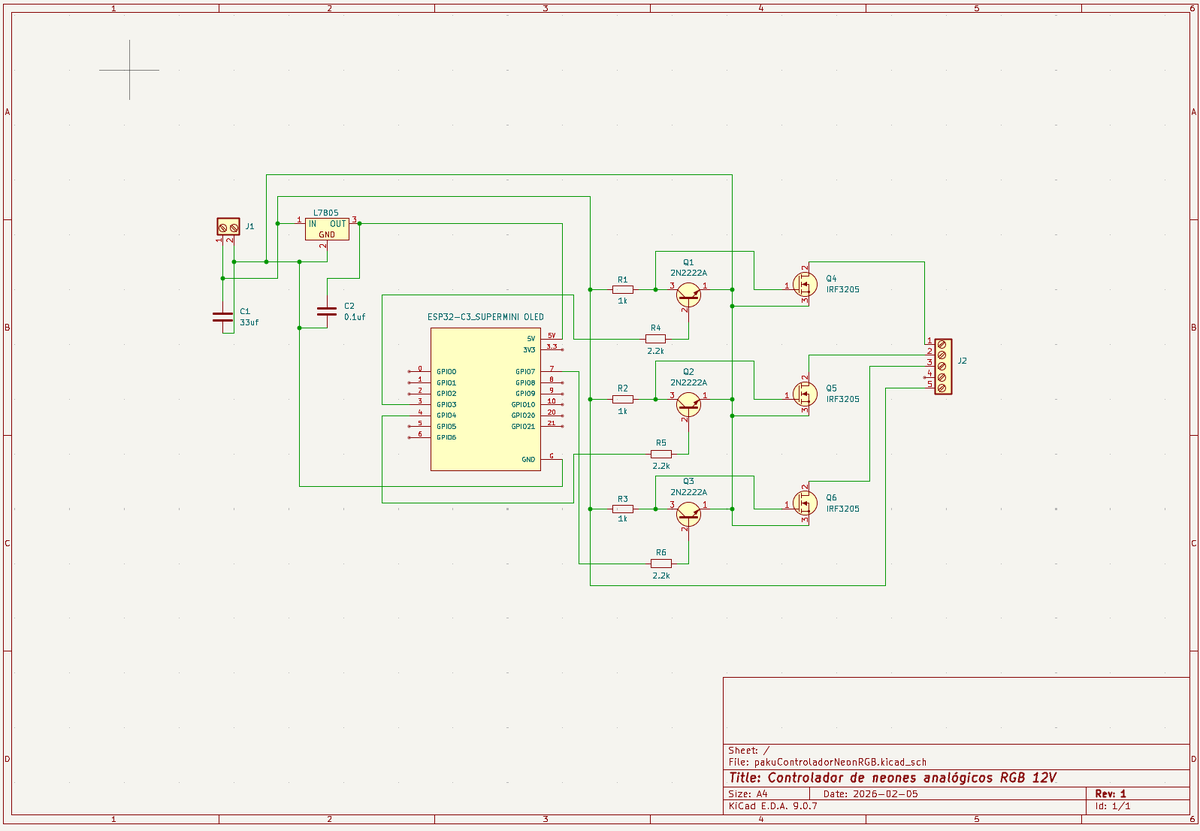
La lógica de cada canal es:
- GPIO del ESP32 → R1 (1 kΩ) → base del 2N2222A
- Colector del 2N2222A → R4 (2,2 kΩ) a 12 V → gate del IRF3205
- Drain del IRF3205 → canal de la tira. Source a GND.
Con GPIO en HIGH el NPN conduce, el gate del MOSFET cae a GND y el MOSFET se cierra (canal apagado). Con GPIO en LOW el NPN corta, el gate sube por R4 y el MOSFET abre (canal encendido). Por eso el firmware invierte la señal PWM: analogWrite(PIN_RED, 255 - currentR).
El L7805 regula los 12 V de alimentación a 5 V para el ESP32-C3. El condensador de 33 µF filtra el rizado, el de 100 nF desacopla el digital.
Los pines usados en el ESP32-C3 SuperMini son: GPIO3 (rojo), GPIO4 (verde), GPIO7 (azul), GPIO5 (SDA del OLED) y GPIO6 (SCL del OLED).
03 — PCB en KiCad y FlatCam
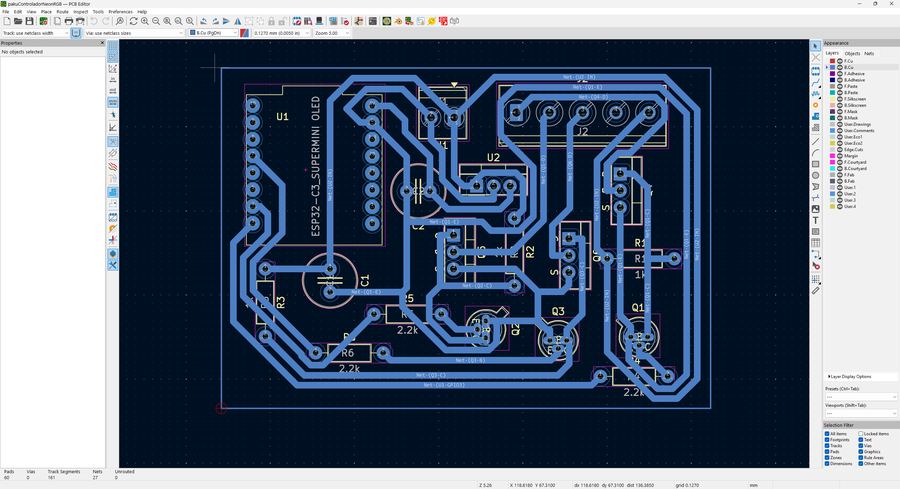
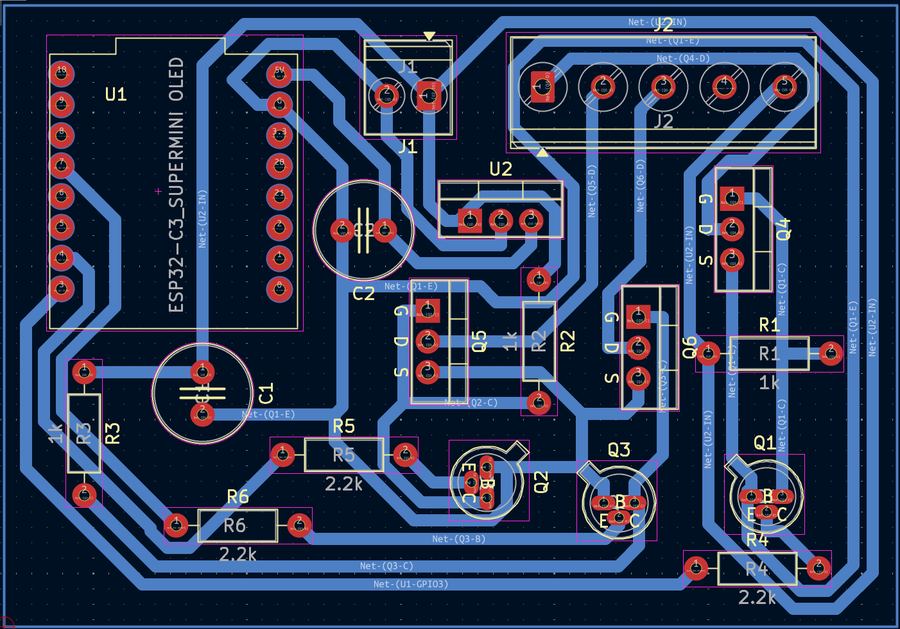
El diseño es de una sola cara (back copper) para que la CNC tenga trabajo mínimo: solo hay que aislar las pistas quitando el cobre sobrante, no hay que taladrar vías. Los componentes son todos through-hole para facilitar el montaje manual.
Del KiCad salen los Gerbers. FlatCam convierte el Gerber de cobre (B_Cu.gbr) en G-code de aislamiento y el .drl de taladros en G-code de perforación. Parámetros que funcionaron con esta fresadora:
- Fresa de aislamiento V-bit 30° a 0,1 mm de profundidad, 600 mm/min
- Broca 0,8 mm para pads, 1,0 mm para los borniers, 3 mm para los MOSFETs
- Contorno con fresa 1 mm a 1,6 mm de profundidad (espesor de la FR4)
04 — Fresado en la CNC del chino
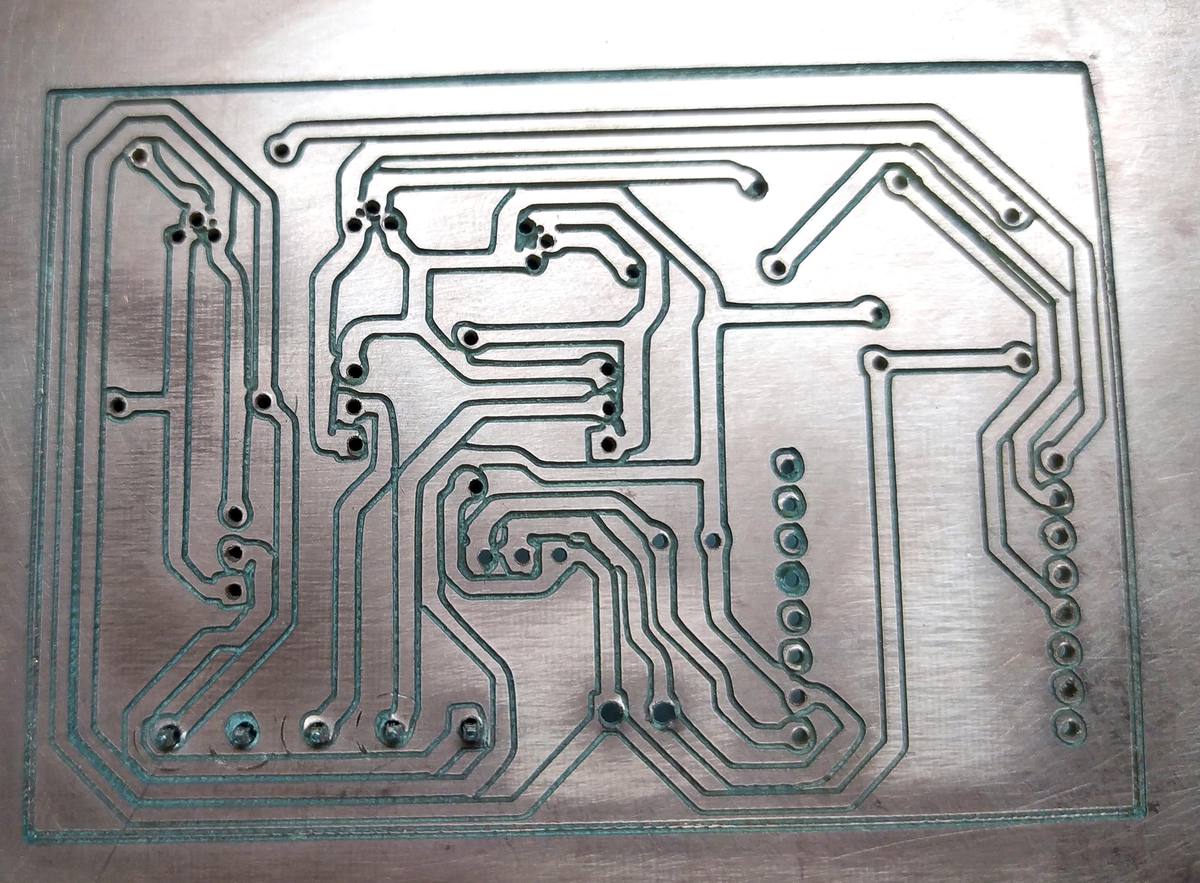
La CNC es una máquina de escritorio de las baratas del chino, con Arduino Uno y GRBL, customizada con un husillo más potente. gSender como sender. El proceso es: nivelar la placa con celo de doble cara, hacer zero en la esquina inferior izquierda, lanzar primero el aislamiento, luego los taladros y por último el contorno.
Aquí el fresado de las pistas y los taladros en directo:
05 — Montaje
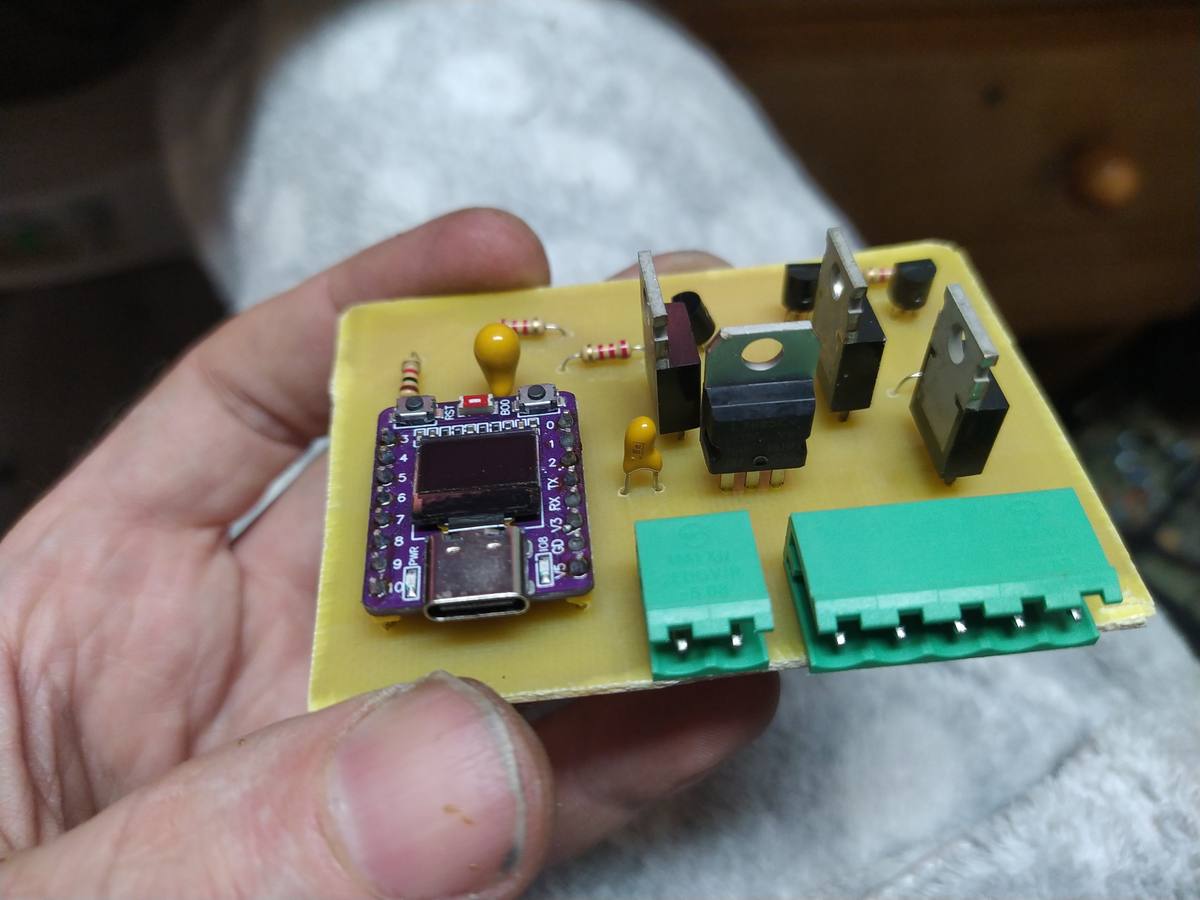
Soldadura convencional, nada especial. Los IRF3205 son componentes TO-220, sujetos con sus patas directamente a la PCB sin disipador porque la corriente prevista no supera 500 mA por canal y el MOSFET apenas calienta. Si se va a tirar de tiras largas (más de 2 metros por canal), conviene añadir un pequeño disipador atornillado.
El conector J1 (2 pines, alimentación 12 V) y J2 (5 pines: GND + R + G + B + 12V para la tira) son borniers de tornillo KF2510 de los de toda la vida.
06 — Firmware: MQTT, BLE y web embebida
El firmware corre en Arduino IDE sobre el ESP32-C3. Tres canales de control simultáneos:
- MQTT: suscrito al topic
casa/neon/set, publica estado encasa/neon/state. Payload JSON:{"r":255,"g":0,"b":0}o formato CSV255,0,0. - BLE (NimBLE): característica GATT con READ/WRITE/NOTIFY para control local sin WiFi.
- Web embebida: servidor AsyncWebServer en puerto 80 con sliders RGB en tiempo real y formulario de configuración WiFi/MQTT. Los valores se guardan en flash con
Preferencesy sobreviven reinicios.
Al arrancar, el ESP32 levanta siempre un punto de acceso (Neon_Config_AP) para la configuración inicial, y en paralelo intenta conectar a la red guardada. La pantalla OLED de 0,42" (72×40 px, driver SSD1306) muestra la IP, estado MQTT, BLE y los valores RGB actuales, actualizada cada 500 ms.
OTA (ArduinoOTA) activo para actualizar el firmware por WiFi sin cables.
Las librerías necesarias en el board manager (ESP32 by Espressif) y en el library manager:
AsyncTCP+ESPAsyncWebServer— servidor web no bloqueanteAsyncMQTT_ESP32— cliente MQTT asíncronoArduinoJson— parseo/serialización de payloadsU8g2— driver OLED universalNimBLE-Arduino— stack BLE ligero para C3
07 — Código completo
Datos de conexión cambiados por valores de ejemplo — pon los tuyos antes de compilar.
#include <Arduino.h>
#include <WiFi.h>
#include <AsyncTCP.h>
#include <ESPAsyncWebServer.h>
#include <AsyncMQTT_ESP32.h>
#include <ArduinoJson.h>
#include <U8g2lib.h>
#include <Wire.h>
#include <ArduinoOTA.h>
#include <NimBLEDevice.h>
#include <Preferences.h>

// --- HARDWARE ESP32-C3 SUPERMINI OLED 0.42" ---
#define PIN_SDA 5
#define PIN_SCL 6

U8G2_SSD1306_72X40_ER_F_HW_I2C u8g2(U8G2_R0, U8X8_PIN_NONE);

// Pines PWM RGB
const int PIN_RED   = 3;
const int PIN_GREEN = 4;
const int PIN_BLUE  = 7;

// --- CONFIG RED DEFAULT (valores de fábrica) ---
const char* AP_SSID_DEFAULT = "Neon_Config_AP";
const char* AP_PASS_DEFAULT = "NeonConfigAP123";

// Valores iniciales — se sobreescriben con lo guardado en flash
char wifi_ssid[32]   = "MiRedWifi";
char wifi_pass[32]   = "MiPasswordWifi";
char mqtt_server[40] = "mqtt.tuservidor.com";
int  mqtt_port       = 1883;
char mqtt_user[32]   = "usuario_mqtt";
char mqtt_pass[32]   = "password_mqtt";

const char* HOSTNAME = "Neon-ESP32C3";

// --- MQTT TOPICS ---
const char* TOPIC_SET_RGB = "casa/neon/set";
const char* TOPIC_STATE   = "casa/neon/state";

// --- BLE UUIDs ---
#define SERVICE_UUID        "4fafc201-1fb5-459e-8fcc-c5c9c331914b"
#define CHARACTERISTIC_UUID "beb5483e-36e1-4688-b7f5-ea07361b26a8"

NimBLECharacteristic *pCharacteristic;
bool deviceConnected = false;

// --- OBJETOS ---
AsyncWebServer server(80);
AsyncMqttClient mqttClient;
TimerHandle_t mqttReconnectTimer;
TimerHandle_t wifiReconnectTimer;
Preferences preferences;

// --- ESTADO ---
int currentR = 0;
int currentG = 0;
int currentB = 0;
bool updateHardwareNeeded = false;
bool shouldRestart = false;
unsigned long lastOledUpdate = 0;

// --- HTML EMBEBIDO ---
const char index_html[] PROGMEM = R"rawliteral(
<!DOCTYPE HTML><html>
<head>
  <meta name="viewport" content="width=device-width, initial-scale=1">
  <title>Neon RGB Config</title>
  <style>
    body { font-family: sans-serif; text-align: center; background: #121212; color: #e0e0e0; margin:0; padding:10px; }
    h2 { color: #2196F3; margin-bottom: 10px; }
    .container { max-width: 400px; margin: 0 auto; }
    .card { background: #1e1e1e; padding: 15px; margin-bottom: 15px; border-radius: 12px; box-shadow: 0 4px 6px rgba(0,0,0,0.5); text-align: left; }
    .card h3 { margin-top: 0; color: #aaa; font-size: 1.1em; border-bottom: 1px solid #333; padding-bottom: 5px; }
    input[type=range] { width: 100%; margin: 10px 0; -webkit-appearance: none; background: #333; height: 6px; border-radius: 3px; }
    input[type=range]::-webkit-slider-thumb { -webkit-appearance: none; width: 20px; height: 20px; background: #2196F3; border-radius: 50%; cursor: pointer; }
    label { font-size: 0.85em; color: #888; display: block; margin-top: 8px; }
    input[type=text], input[type=password], input[type=number] { width: 100%; padding: 8px; margin-top: 4px; box-sizing: border-box; background: #2c2c2c; border: 1px solid #444; color: white; border-radius: 4px; }
    .btn-save { background: #008CBA; color: white; border: none; padding: 12px; width: 100%; border-radius: 5px; font-size: 1em; cursor: pointer; margin-top: 15px; }
    .btn-save:hover { background: #007bb5; }
    .preview-box { width: 100%; height: 40px; border-radius: 6px; border: 2px solid #444; margin-bottom: 15px; background: #000; transition: background 0.1s; }
    .color-row { display: flex; align-items: center; justify-content: space-between; margin-bottom: 5px; }
    .val-display { font-weight: bold; font-family: monospace; color: #fff; }
    .mqtt-table { width: 100%; font-size: 0.8em; border-collapse: collapse; color: #bbb; }
    .mqtt-table td { padding: 4px 0; border-bottom: 1px solid #333; }
    .topic-code { color: #4caf50; font-family: monospace; word-break: break-all; }
  </style>
</head>
<body>
<div class="container">
  <h2>Neon Controlador RGB</h2>

  <div class="card">
    <h3>Control Manual</h3>
    <div id="preview" class="preview-box"></div>
    <div class="color-row"><label>Rojo</label><span id="valR" class="val-display">0</span></div>
    <input type="range" min="0" max="255" id="r" value="%R%" oninput="updateLive(true)">
    <div class="color-row"><label>Verde</label><span id="valG" class="val-display">0</span></div>
    <input type="range" min="0" max="255" id="g" value="%G%" oninput="updateLive(true)">
    <div class="color-row"><label>Azul</label><span id="valB" class="val-display">0</span></div>
    <input type="range" min="0" max="255" id="b" value="%B%" oninput="updateLive(true)">
    <label>Picker Rápido</label>
    <input type="color" id="picker" style="width:100%; height:35px; border:none; padding:0;" oninput="pickHex()">
  </div>

  <div class="card">
    <h3>Info MQTT</h3>
    <table class="mqtt-table">
      <tr><td>Comando (Set):</td></tr>
      <tr><td class="topic-code">%TOPIC_SET%</td></tr>
      <tr><td>Estado (State):</td></tr>
      <tr><td class="topic-code">%TOPIC_STATE%</td></tr>
      <tr><td style="font-style:italic; color:#666;">Payload: {"r":255, "g":0, "b":0} o 255,0,0</td></tr>
    </table>
  </div>

  <div class="card">
    <h3>Configuración WiFi & MQTT</h3>
    <form action="/save" method="POST">
      <label>WiFi SSID</label>
      <input type="text" name="ssid" value="%SSID%">
      <label>WiFi Password</label>
      <input type="password" name="pass" value="%PASS%">
      <label>MQTT Server</label>
      <input type="text" name="server" value="%MQTT_SRV%">
      <label>MQTT Port</label>
      <input type="number" name="port" value="%MQTT_PORT%">
      <label>MQTT User</label>
      <input type="text" name="user" value="%MQTT_USER%">
      <label>MQTT Password</label>
      <input type="password" name="mqpass" value="%MQTT_PASS%">
      <button type="submit" class="btn-save">Guardar y Reiniciar</button>
    </form>
  </div>
</div>

<script>
window.onload = function() { updateLive(false); };

function updateLive(send) {
  var r = document.getElementById('r').value;
  var g = document.getElementById('g').value;
  var b = document.getElementById('b').value;
  document.getElementById('valR').innerText = r;
  document.getElementById('valG').innerText = g;
  document.getElementById('valB').innerText = b;
  document.getElementById('preview').style.backgroundColor = 'rgb(' + r + ',' + g + ',' + b + ')';
  if(send) {
    fetch("/set?r="+r+"&g="+g+"&b="+b).catch(e => console.log(e));
  }
}

function pickHex() {
  var hex = document.getElementById('picker').value;
  var r = parseInt(hex.substr(1,2),16);
  var g = parseInt(hex.substr(3,2),16);
  var b = parseInt(hex.substr(5,2),16);
  document.getElementById('r').value = r;
  document.getElementById('g').value = g;
  document.getElementById('b').value = b;
  updateLive(true);
}
</script>
</body>
</html>
)rawliteral";

// --- PROTOTIPOS ---
void connectToWifi();
void connectToMqtt();
void updatePWM();
void notifyState();
void onMqttMessage(char* topic, char* payload, AsyncMqttClientMessageProperties properties, size_t len, size_t index, size_t total);
void loadConfig();
String processor(const String& var);

// --- BLE CALLBACKS ---
class MyServerCallbacks: public NimBLEServerCallbacks {
    void onConnect(NimBLEServer* pServer, NimBLEConnInfo& connInfo) override {
        deviceConnected = true;
    };
    void onDisconnect(NimBLEServer* pServer, NimBLEConnInfo& connInfo, int reason) override {
        deviceConnected = false;
    }
};

class MyCallbacks: public NimBLECharacteristicCallbacks {
    void onWrite(NimBLECharacteristic *pCharacteristic, NimBLEConnInfo& connInfo) override {
        std::string value = pCharacteristic->getValue();
        if (value.length() > 0) {
            JsonDocument doc;
            DeserializationError error = deserializeJson(doc, value);
            if (!error) {
                if(doc["r"].is<int>()) currentR = doc["r"];
                if(doc["g"].is<int>()) currentG = doc["g"];
                if(doc["b"].is<int>()) currentB = doc["b"];
                updateHardwareNeeded = true;
            }
        }
    }
};

// --- PWM (lógica inversa: NPN abre con HIGH, MOSFET cierra) ---
void updatePWM() {
    analogWrite(PIN_RED,   255 - currentR);
    analogWrite(PIN_GREEN, 255 - currentG);
    analogWrite(PIN_BLUE,  255 - currentB);
    notifyState();
}

void notifyState() {
    if(mqttClient.connected()) {
        JsonDocument doc;
        doc["r"] = currentR; doc["g"] = currentG; doc["b"] = currentB;
        char buffer[128];
        serializeJson(doc, buffer);
        mqttClient.publish(TOPIC_STATE, 0, true, buffer);
    }
    if(deviceConnected) {
        char buffer[20];
        snprintf(buffer, sizeof(buffer), "%d,%d,%d", currentR, currentG, currentB);
        pCharacteristic->setValue(buffer);
        pCharacteristic->notify();
    }
}

// --- PERSISTENCIA EN FLASH ---
void loadConfig() {
    preferences.begin("neon_config", false);
    String s_ssid = preferences.getString("ssid", wifi_ssid);
    String s_pass = preferences.getString("pass", wifi_pass);
    String s_msrv = preferences.getString("msrv", mqtt_server);
    int    s_mprt = preferences.getInt("mprt", mqtt_port);
    String s_musr = preferences.getString("musr", mqtt_user);
    String s_mpas = preferences.getString("mpas", mqtt_pass);
    s_ssid.toCharArray(wifi_ssid, 32);
    s_pass.toCharArray(wifi_pass, 32);
    s_msrv.toCharArray(mqtt_server, 40);
    mqtt_port = s_mprt;
    s_musr.toCharArray(mqtt_user, 32);
    s_mpas.toCharArray(mqtt_pass, 32);
    preferences.end();
}

// Procesador de plantilla HTML: inyecta valores actuales en los %TAG%
String processor(const String& var){
  if(var == "R") return String(currentR);
  if(var == "G") return String(currentG);
  if(var == "B") return String(currentB);
  if(var == "SSID") return String(wifi_ssid);
  if(var == "PASS") return String(wifi_pass);
  if(var == "MQTT_SRV") return String(mqtt_server);
  if(var == "MQTT_PORT") return String(mqtt_port);
  if(var == "MQTT_USER") return String(mqtt_user);
  if(var == "MQTT_PASS") return String(mqtt_pass);
  if(var == "TOPIC_SET") return String(TOPIC_SET_RGB);
  if(var == "TOPIC_STATE") return String(TOPIC_STATE);
  return String();
}

// --- CONEXIÓN WiFi/MQTT ---
void connectToWifi() {
    if(String(wifi_ssid).length() > 1) {
        WiFi.begin(wifi_ssid, wifi_pass);
    }
}

void connectToMqtt() {
    if(String(mqtt_server).length() > 1) {
        connectToWifi();
        mqttClient.connect();
    }
}

void onWifiEvent(WiFiEvent_t event) {
    switch(event) {
        case ARDUINO_EVENT_WIFI_STA_GOT_IP:
            connectToMqtt();
            break;
        case ARDUINO_EVENT_WIFI_STA_DISCONNECTED:
            xTimerStop(mqttReconnectTimer, 0);
            xTimerStart(wifiReconnectTimer, 0);
            break;
        default: break;
    }
}

void onMqttConnect(bool sessionPresent) {
    mqttClient.subscribe(TOPIC_SET_RGB, 0);
}

void onMqttMessage(char* topic, char* payload, AsyncMqttClientMessageProperties properties, size_t len, size_t index, size_t total) {
    JsonDocument doc;
    DeserializationError error = deserializeJson(doc, payload, len);
    if (!error) {
        if(doc["r"].is<int>()) currentR = doc["r"];
        if(doc["g"].is<int>()) currentG = doc["g"];
        if(doc["b"].is<int>()) currentB = doc["b"];
        updateHardwareNeeded = true;
    }
}

// --- SETUP ---
void setup() {
    Serial.begin(115200);
    delay(2000);

    loadConfig();

    pinMode(PIN_RED,   OUTPUT);
    pinMode(PIN_GREEN, OUTPUT);
    pinMode(PIN_BLUE,  OUTPUT);
    // Lógica inversa: 255 = canal apagado
    analogWrite(PIN_RED, 255);
    analogWrite(PIN_GREEN, 255);
    analogWrite(PIN_BLUE, 255);

    Wire.begin(PIN_SDA, PIN_SCL);
    u8g2.begin();
    u8g2.clearBuffer();
    u8g2.setFont(u8g2_font_5x8_tr);
    u8g2.drawStr(0, 10, "BOOTING...");
    u8g2.sendBuffer();

    mqttReconnectTimer = xTimerCreate("mqttTimer", pdMS_TO_TICKS(2000), pdFALSE, (void*)0,
                            reinterpret_cast<TimerCallbackFunction_t>(connectToMqtt));
    wifiReconnectTimer = xTimerCreate("wifiTimer", pdMS_TO_TICKS(2000), pdFALSE, (void*)0,
                            reinterpret_cast<TimerCallbackFunction_t>(connectToWifi));

    WiFi.onEvent(onWifiEvent);
    WiFi.mode(WIFI_AP_STA);
    WiFi.softAP(AP_SSID_DEFAULT, AP_PASS_DEFAULT);

    ArduinoOTA.setHostname(HOSTNAME);
    ArduinoOTA.setPassword("password_ota");
    ArduinoOTA.begin();

    connectToWifi();

    mqttClient.onConnect(onMqttConnect);
    mqttClient.onMessage(onMqttMessage);
    mqttClient.setServer(mqtt_server, mqtt_port);
    mqttClient.setCredentials(mqtt_user, mqtt_pass);

    // Rutas web
    server.on("/", HTTP_GET, [](AsyncWebServerRequest *request){
        request->send_P(200, "text/html", index_html, processor);
    });
    server.on("/set", HTTP_GET, [](AsyncWebServerRequest *request){
        if(request->hasParam("r")) currentR = request->getParam("r")->value().toInt();
        if(request->hasParam("g")) currentG = request->getParam("g")->value().toInt();
        if(request->hasParam("b")) currentB = request->getParam("b")->value().toInt();
        updateHardwareNeeded = true;
        request->send(200, "text/plain", "OK");
    });
    server.on("/save", HTTP_POST, [](AsyncWebServerRequest *request){
        preferences.begin("neon_config", false);
        if(request->hasParam("ssid",   true)) preferences.putString("ssid", request->getParam("ssid",   true)->value());
        if(request->hasParam("pass",   true)) preferences.putString("pass", request->getParam("pass",   true)->value());
        if(request->hasParam("server", true)) preferences.putString("msrv", request->getParam("server", true)->value());
        if(request->hasParam("port",   true)) preferences.putInt   ("mprt", request->getParam("port",   true)->value().toInt());
        if(request->hasParam("user",   true)) preferences.putString("musr", request->getParam("user",   true)->value());
        if(request->hasParam("mqpass", true)) preferences.putString("mpas", request->getParam("mqpass", true)->value());
        preferences.end();
        request->send(200, "text/html", "<h1>Guardado. Reiniciando...</h1><script>setTimeout(function(){window.location.href='/';}, 5000);</script>");
        shouldRestart = true;
    });
    server.begin();

    // BLE
    NimBLEDevice::init(HOSTNAME);
    NimBLEDevice::setPower(ESP_PWR_LVL_P9);
    NimBLEServer *pServer = NimBLEDevice::createServer();
    pServer->setCallbacks(new MyServerCallbacks());
    NimBLEService *pService = pServer->createService(SERVICE_UUID);
    pCharacteristic = pService->createCharacteristic(
                        CHARACTERISTIC_UUID,
                        NIMBLE_PROPERTY::READ |
                        NIMBLE_PROPERTY::WRITE |
                        NIMBLE_PROPERTY::NOTIFY
                      );
    pCharacteristic->setCallbacks(new MyCallbacks());
    pService->start();
    NimBLEAdvertising *pAdvertising = NimBLEDevice::getAdvertising();
    pAdvertising->addServiceUUID(SERVICE_UUID);
    pAdvertising->start();
}

// --- LOOP ---
void loop() {
    ArduinoOTA.handle();

    if (shouldRestart) {
        delay(1000);
        ESP.restart();
    }

    if (updateHardwareNeeded) {
        updateHardwareNeeded = false;
        updatePWM();
    }

    // OLED: actualiza cada 500 ms
    if (millis() - lastOledUpdate > 500) {
        lastOledUpdate = millis();
        u8g2.firstPage();
        do {
            u8g2.setFont(u8g2_font_5x8_tr);
            u8g2.setCursor(0, 8);
            if(WiFi.status() == WL_CONNECTED) {
                String ip = WiFi.localIP().toString();
                u8g2.print(ip.substring(ip.lastIndexOf('.')+1));
                u8g2.print(" M:");
                u8g2.print(mqttClient.connected() ? "Y" : "N");
            } else {
                u8g2.print("AP: "); u8g2.print(AP_SSID_DEFAULT);
            }
            u8g2.setCursor(0, 18);
            u8g2.print("BLE:"); u8g2.print(deviceConnected ? "ON" : "--");
            u8g2.setCursor(0, 28);
            u8g2.print("R"); u8g2.print(currentR);
            u8g2.print(" G"); u8g2.print(currentG);
            u8g2.setCursor(0, 38);
            u8g2.print("B"); u8g2.print(currentB);
        } while (u8g2.nextPage());
    }
}