makeQR is a QR code generator for Windows that fits in a ~3 MB executable and needs no installation. It turns text, URLs and vCard contact cards into print-ready or shareable PNG images. Written in Go against the native Win32 API: no Electron, no frameworks, no dependencies.
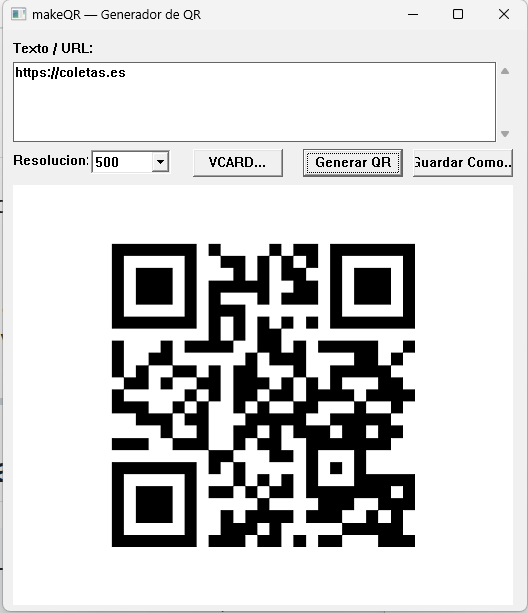
01 — What makeQR does
The tool has two input modes and a single goal: produce a PNG image with the corresponding QR code.
Text/URL mode. Type or paste any string of text — a URL, a phone number, a short message — into the text box, pick the resolution and hit Generate QR. The code appears instantly in the window. If you're happy with it, Save as… opens Windows' native file dialog to choose where to save it.
vCard mode. The VCARD… button opens a form with the standard fields of a contact card: name, phone, email, company and address. makeQR builds the BEGIN:VCARD … END:VCARD block internally and generates the QR code from it. Any modern contacts app (Android, iOS, Outlook) recognizes this format and adds the contact straight away when scanned.
The available resolutions are 200, 300, 500, 800, 1000 and 2000 pixels. For printing on A4 paper at good quality, 500 or 800 are more than enough. For a display screen or a large poster, go with 2000.
02 — Native Win32 interface in Go
Most small desktop tools for Windows are built today with Electron (which drags in Node.js and Chromium) or with .NET frameworks that require installing a runtime. makeQR takes a different route: it calls the Windows Win32 API directly from Go using the standard library's syscall package.
The result is an executable with no external dependencies at all. Windows already ships the system DLLs the app needs (user32.dll, gdi32.dll, comctl32.dll). Startup is instant and memory use is minimal.
The bulk of the interface lives in gui.go: registering the window class, the Win32 message loop, creating controls (buttons, text box, resolution combobox) and rendering the QR bitmap in the preview area. Building it requires CGO enabled and MinGW-w64 to link against the system DLLs:
go build -ldflags "-H windowsgui" -o makeQR.exe .
The -H windowsgui flag tells the linker that this is a desktop application, not a console one: Windows doesn't open a terminal window when you launch it.
The project layout is intentionally flat — four Go files with clear responsibilities:
- main.go — detects whether there are command-line arguments and decides whether to launch the GUI or CLI mode.
- gui.go — the whole Win32 window: controls, message loop and painting the QR code on screen.
- qr.go — wraps the QR generation library and returns an
image.Image. - vcard.go — builds the vCard 3.0 text from the form fields.
03 — QR code generation
The actual QR code generation is handled by the skip2/go-qrcode library, which implements the ISO 18004 standard. makeQR uses it through qr.go, which is intentionally thin:
package main

import (
    "image"
    qrcode "github.com/skip2/go-qrcode"
)

func generateQR(content string, size int) (image.Image, error) {
    qr, err := qrcode.New(content, qrcode.Medium)
    if err != nil {
        return nil, err
    }
    return qr.Image(size), nil
}
The chosen error-correction level is Medium (≈15% recovery). It's a reasonable trade-off: the codes stay more compact than with the High level while still remaining readable if the paper gets slightly folded or the image has some noise.
The generated QR code is a standard Go image.Image. gui.go converts it to a Win32 HBITMAP to display it in the window; saving as PNG uses the standard image/png package.
04 — vCard 3.0 contact cards
The vCard 3.0 standard (RFC 2426) is the format phones use to exchange contacts. A QR code containing a valid vCard block can be read directly by the camera on Android, iOS and most modern QR readers, which offer the user the option to add the contact to their address book.
vcard.go builds the block from the form fields:
package main

import "fmt"

func buildVCard(name, phone, email, org, address string) string {
    return fmt.Sprintf(
        "BEGIN:VCARD\r\nVERSION:3.0\r\nFN:%s\r\nTEL:%s\r\nEMAIL:%s\r\nORG:%s\r\nADR:;;%s\r\nEND:VCARD",
        name, phone, email, org, address,
    )
}
The mandatory line break in vCard is \r\n (CRLF), not just \n. Some readers are lenient about it, but for maximum compatibility with older devices it's worth sticking to the standard.
05 — CLI mode for scripts
Besides the GUI, makeQR has a command-line mode that's handy for generating QR codes from PowerShell or CMD scripts without opening any window:
makeQR.exe "https://coletas.es" salida.png 500
The three arguments are: the text to encode, the output file, and the size in pixels. main.go detects whether arguments were passed and calls generateQR directly without initializing the GUI.
This makes it useful for automation: batch-generating QR codes for URLs, plugging it into a document-generation pipeline, or wiring it into scripts that assemble print materials.
06 — Building and downloading
The repository includes a precompiled executable (makeQR.exe, ~3 MB) you can download and run directly on any 64-bit Windows machine with nothing to install. To build it yourself you need Go 1.21 or later and MinGW-w64:
git clone https://github.com/unmateria/GOQR-Maker.git
cd GOQR-Maker
go build -ldflags "-H windowsgui" -o makeQR.exe .
The Go dependencies download themselves at build time (go.mod already declares them). The only external requirement is MinGW-w64 so CGO can link against the Win32 DLLs. On Windows you can install it from mingw-w64.org or through MSYS2.
The source code is at github.com/unmateria/GOQR-Maker under the MIT license. If you'd rather not build it, download the executable directly:
Download makeQR.exe (~3 MB · Windows x64 · no installation)