In early 2026, while building an AI system that translated natural-language questions into SQL queries against a client's ERP, I found there was no convenient way to review or edit the ChromaDB knowledge base without opening a Python terminal. So I built the editor I was missing. I'm publishing it in case it's useful to someone else too.
01 — What ChromaDB is and what it's used for
When you build an AI system that needs to "remember" things — documents, examples, context, business knowledge — you need somewhere to store that information so the AI can find it efficiently. A normal SQL database won't do, because the AI doesn't search by exact words, it searches by semantic similarity: it looks for phrases that mean the same thing even if they use different words.
That's what vector databases are for. ChromaDB is one of the most widely used: open source, easy to install, with a very approachable Python API, and with more than enough performance for small and medium-sized projects. It's used by thousands of RAG (Retrieval-Augmented Generation) projects — the technique that lets a language model like GPT-4 or Claude consult its own knowledge base before answering.
In practice, ChromaDB stores each document or example as a numeric vector (the "embedding") together with the original text and whatever metadata you want to attach. When the system needs to recall something relevant to a question, it converts that question into a vector and looks for the closest vectors. It's a similarity search, not a keyword search.
In my specific case, the knowledge base stored pairs of question and SQL query: "How much did we invoice in 2025?" → SELECT SUM(importe_total) AS Facturacion_2025 FROM [TICKETS] WHERE YEAR(fecha_ticket) = 2025. Whenever the AI agent received a new question, it looked up the most similar examples in ChromaDB and used them as context to generate the right query. That pattern is called RAG, and it's one of the most reliable ways to connect a language model to real business data without having to train it from scratch.
02 — The problem: a database with no editor
ChromaDB is great at what it does, but it has one practical weak spot: it doesn't ship with any interface for browsing or editing the data. If you want to see what's inside, you have to do it through Python code. If you want to fix a question-answer pair that's wrong, same story. If you want to delete a duplicate record, likewise.
When the knowledge base has ten records, it's not a problem. When it has several hundred — and you're adding to it bit by bit while the system is in production — it becomes a source of constant frustration. You want to see the full list, search for something specific, edit a SQL query that's wrong, delete an example that no longer applies... and for all of that you're stuck opening Python scripts or the interactive console.
Under the hood, ChromaDB persists its data in a SQLite file (chroma.sqlite3) containing all the text, the metadata and a full-text FTS5 index. The vectors themselves live in separate folders in binary format. The first part is perfectly readable and editable without touching Python or the ChromaDB server. That's what gave me the idea.
03 — What the editor does
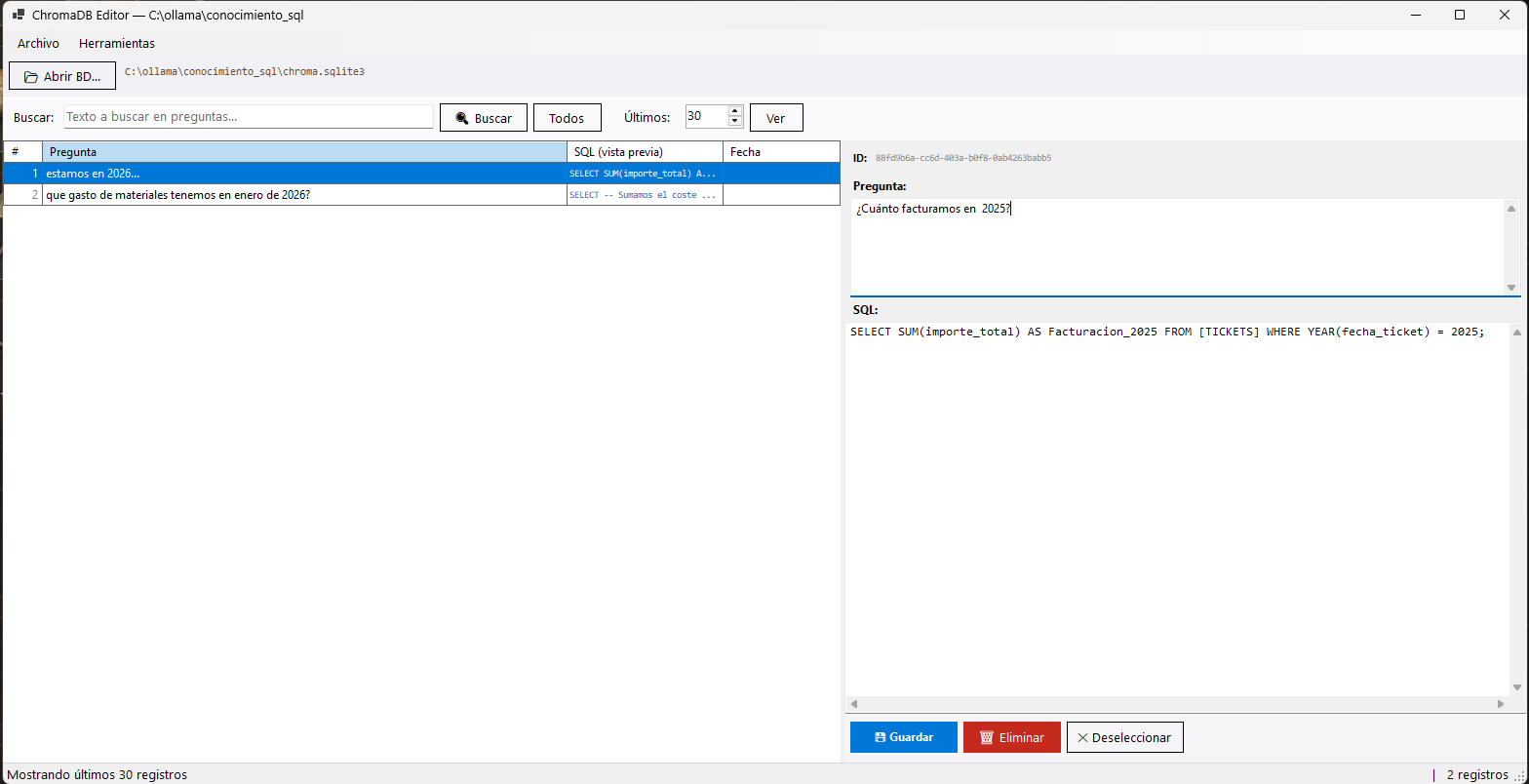
The application opens the chroma.sqlite3 file directly and lists the records with columns for question, SQL preview and date. The right-hand panel loads the full detail of the selected record: the question text and its associated SQL query, both editable. Changes are saved straight back to the SQLite file, including an update to the FTS5 index.
On top of basic editing, the editor includes text search, configurable pagination to view the last N records or the whole collection, single or multiple deletion with confirmation, import and export in JSONL format, import from another ChromaDB instance, and full database cloning (SQLite plus the HNSW vector index folders).
There's also a token analysis that estimates how many tokens the whole knowledge base takes up, with P90, P95, P99 percentiles and the maximum, and recommends the max_sequence_length value to use for fine-tuning with frameworks like Axolotl. It's a rough estimate, but it's good enough for setting up a training run.
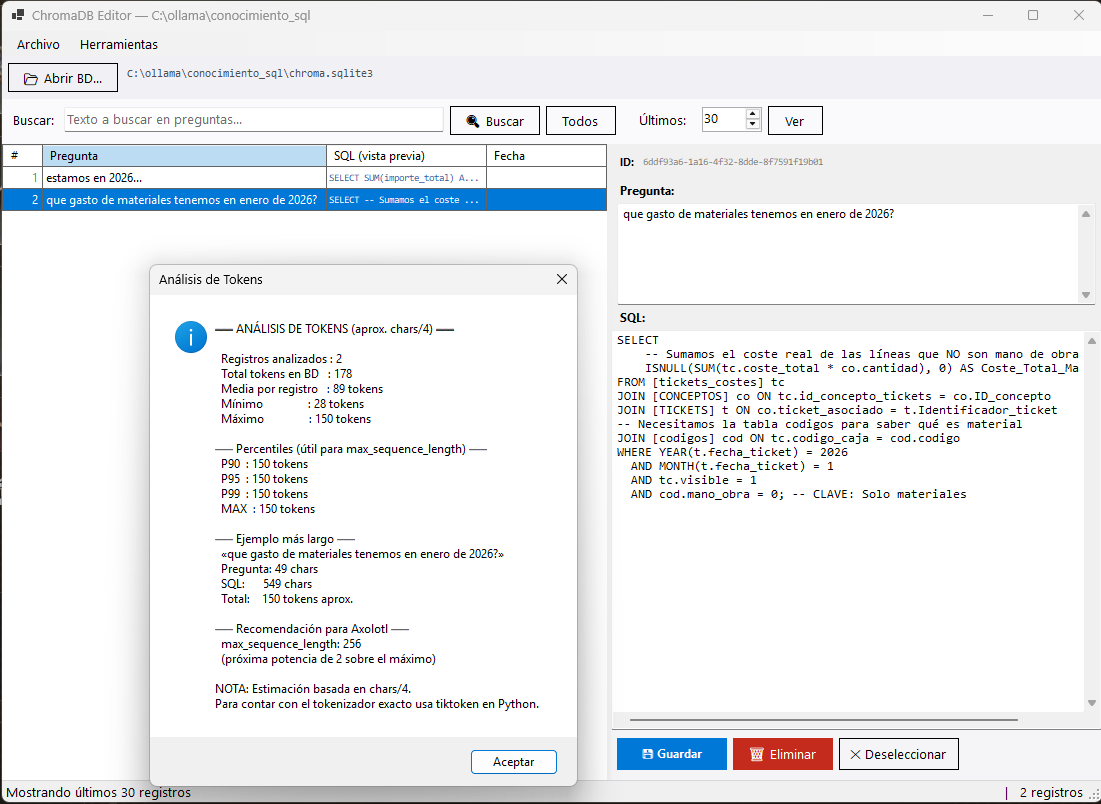
max_sequence_length for fine-tuning.One important clarification worth understanding: the editor works with the text and the metadata, not with the vectors. If you import new records from outside, those records will be visible and searchable by text, but they won't show up in semantic search until you regenerate the embeddings through the corresponding Python pipeline. That's a limitation inherent to how ChromaDB works, not to the editor.
04 — No Python, no server, no dependencies
The application is built in VB.NET with Windows Forms on top of .NET 9. It doesn't need Python installed, it doesn't need the ChromaDB server running, it needs nothing more than running the .exe. The published executable is self-contained: it includes the .NET runtime and the SQLite library, and weighs around 50 MB.
The decision to build it as a native .NET app instead of a web interface or a VS Code extension was deliberate. In the environment where it was born — a Windows server running IIS, no Docker, no Python virtual environments reliably available at all times — I wanted something that would open with a double-click and just work. Nothing to install, nothing to configure, no depending on the project's Python environment being in good shape.
For most projects using ChromaDB, the bottleneck isn't the vector search itself — which ChromaDB handles very well — it's knowledge management: curating the examples, fixing the ones that are wrong, adding new cases the system doesn't handle well. That doesn't need an embedding model. It needs a text editor with a list and a save button.
05 — GitHub, source code and download
The project is published on GitHub with the full source code, build instructions and an installer generated with Inno Setup. The only external dependency is Microsoft.Data.Sqlite, which is bundled into the final executable.
→ github.com/unmateria/.NET-ChromaDBEditor
This isn't a project with big ambitions of becoming a product. It's a tool I built for one specific problem, it works well for that problem, and I've left it available in case someone else is in a similar situation. If it turns out useful to someone building a RAG system with ChromaDB who doesn't want to open Python every time they need to tweak the knowledge base, then it's done its job.